
In an age where data is often called the new oil, entrusting our most personal and professional information to third-party cloud providers has become a common practice. 💡
However, this convenience often comes at a cost: a lack of control over our data, potential privacy concerns, and reliance on services that might not always align with our evolving needs.
The allure of self-hosting, therefore, grows stronger every day. 🤓
It’s about taking back the reins, building a digital sanctuary on your terms, and ensuring your data resides where you want it to be – securely under your roof.
This comprehensive guide dives deep into the world of self-hosted cloud alternatives, comparing the leading contenders and empowering you to make an informed decision about your digital future.
Why Go Self-Hosted? The Imperative for Control 🔒
The reasons to pivot from commercial cloud services to a self-hosted solution are numerous and compelling.
At its core, it’s about sovereignty.
When you self-host, you become the sole proprietor of your data center, whether it’s a dedicated server in your home office or a virtual private server (VPS) in a data center you choose.
One of the primary drivers is data privacy.
With major cloud providers, your data is stored on their servers, subject to their terms of service, and potentially accessible by various entities under certain legal frameworks.
Self-hosting eliminates this middleman, placing your data entirely under your control and often allowing for superior encryption and access policies that you define.
Another crucial factor is customization and flexibility.
Commercial cloud solutions often offer a one-size-fits-all approach, with limited options for tailoring the experience to your specific workflows or integrating with specialized tools.
Self-hosted platforms, particularly open-source ones, provide an unparalleled degree of customization, allowing you to install plugins, modify code, and build an environment that perfectly suits your requirements. 🛠️
Cost-effectiveness can also be a significant advantage, especially for larger teams or long-term usage.
While there’s an initial setup cost and ongoing maintenance, avoiding recurring subscription fees can lead to substantial savings over time.
Furthermore, self-hosting fosters digital resilience. 🛡️
You’re not beholden to a single provider’s uptime or their decisions regarding service changes or discontinuation.
You control the destiny of your digital assets.
“The only way to do great work is to love what you do. If you haven’t found it yet, keep looking. Don’t settle. As with all matters of the heart, you’ll know when you find it.” – Steve Jobs
Understanding the Landscape: Key Features to Consider 🗺️
Before diving into specific alternatives, it’s essential to understand the core features that define a robust self-hosted cloud solution.
These features will guide your decision-making process and ensure the chosen platform meets your expectations.
- File Sync and Share: This is the bread and butter of any cloud solution. It should offer seamless synchronization across devices (desktops, laptops, mobile) and easy file sharing with granular permission controls.
- Collaboration Tools: Modern work often requires real-time collaboration. Look for features like document co-editing, version control, and commenting capabilities.
- Security: Robust encryption (at rest and in transit), two-factor authentication (2FA), and comprehensive access control mechanisms are non-negotiable.
- Integrations: The ability to connect with other applications (e.g., calendars, contacts, project management tools, communication platforms) can significantly enhance productivity.
- User Management: For teams or families, easy creation and management of user accounts, groups, and permissions are vital.
- Mobile and Desktop Clients: Dedicated clients for various operating systems ensure a smooth and integrated user experience.
- Scalability: Can the solution grow with your needs, accommodating more users, larger storage, and increased traffic without significant performance degradation?
- Ease of Installation and Maintenance: While self-hosting requires some technical acumen, a user-friendly installation process and clear documentation can save a lot of headaches.
The Contenders: Top Self-Hosted Cloud Alternatives 🏆
Now, let’s explore the leading self-hosted cloud solutions that offer compelling alternatives to commercial giants.
Each has its strengths and nuances, catering to different needs and technical proficiencies.
1. Nextcloud: The Feature-Rich Powerhouse 🚀
Nextcloud is arguably the most popular and comprehensive open-source self-hosted cloud platform available today.
It’s a fork of ownCloud (which we’ll discuss next) and has evolved into a full-fledged productivity suite.
Nextcloud offers an extensive array of features that go far beyond simple file storage.
You get file sync and share, calendaring, contacts, email integration, video conferencing (Talk), office suite integration (Nextcloud Office, powered by Collabora or ONLYOFFICE), and much more.
Its modular design, with a vast app store, allows users to extend its functionality almost infinitely, tailoring it to specific needs like project management, password management, or even personal journaling.
Security is a top priority for Nextcloud, with features like end-to-end encryption, brute-force protection, and extensive logging capabilities.
The community support is robust, and there are numerous guides and resources available for installation and troubleshooting.
Nextcloud is an excellent choice for individuals, families, and businesses looking for an all-in-one productivity platform that offers unparalleled control and flexibility.
It can be a bit resource-intensive, so a capable server or VPS is recommended.
Learn more about Nextcloud’s capabilities on their official website: Nextcloud Official Site.
2. ownCloud: The Enterprise-Grade Pioneer 🏗️
ownCloud is the original open-source self-hosted file sync and share solution that paved the way for many others.
While Nextcloud has garnered significant community attention, ownCloud continues to be a strong contender, particularly in enterprise environments.
It offers robust file sync and share functionalities, strong security features, and a focus on scalability and compliance.
ownCloud comes in two main flavors: ownCloud Community Edition (open-source) and ownCloud Enterprise Edition (commercial).
The Enterprise Edition provides additional features like advanced integrations, professional support, and enhanced security modules, making it suitable for organizations with stringent requirements.
Compared to Nextcloud, ownCloud tends to focus more exclusively on file sync and share, with a leaner approach to bundled productivity tools.
However, it still offers a marketplace for extensions to expand its capabilities.
For those prioritizing a rock-solid, secure, and highly scalable file synchronization platform, especially in a business context, ownCloud remains a formidable choice.
Explore ownCloud’s offerings in more detail: ownCloud Official Site.
“You can have everything in life you want, if you will just help enough other people get what they want.” – Zig Ziglar
3. Seafile: Performance and Reliability First ⚡
Seafile stands out for its exceptional performance, reliability, and efficient handling of large files and numerous files.
Unlike Nextcloud and ownCloud, which are built on PHP, Seafile is primarily written in C and Python, contributing to its speed and lower resource consumption.
Its architecture uses a unique object storage model, where files are broken down into small blocks, ensuring efficient storage and synchronization, especially for binary files and versioning.
Seafile offers core file sync and share capabilities, collaboration features like version control and document locking, and a built-in Wiki for team knowledge management.
It also provides strong encryption and client-side encryption options.
While it might not have the extensive app ecosystem of Nextcloud, Seafile excels in its core competency: fast, reliable, and secure file synchronization.
If your primary concern is high-performance file synchronization and sharing, especially with large datasets or many small files, Seafile is an excellent candidate.
It’s often favored by technical users and businesses where speed and stability are paramount.
Discover Seafile’s performance advantages: Seafile Official Site.
4. Pydio Cells: Modern Architecture for Teams 🧪
Pydio Cells, formerly known as AjaXplorer, is a modern file sharing and collaboration platform designed for enterprises.
It’s built with Go, a language known for its efficiency and concurrency, which contributes to Pydio Cells’ robust performance.
Pydio Cells offers a comprehensive suite of features including secure file sync and share, advanced access controls, built-in media viewers, and collaboration tools.
Its “Cells” concept allows for creating isolated workspaces for different teams or projects, enhancing security and organizational clarity.
Pydio emphasizes security and compliance, making it suitable for organizations with strict regulatory requirements.
It integrates well with existing IT infrastructures, offering various authentication methods and storage backends.
While Pydio Cells has a strong focus on the enterprise market, its community edition provides a powerful self-hosted solution for technically proficient individuals and smaller teams seeking a modern and secure platform.
It might have a steeper learning curve than some other options but offers deep control and advanced features.
Explore the features of Pydio Cells: Pydio Official Site.
5. FileCloud: Robust and Secure Enterprise File Sharing 🏢
FileCloud is a powerful and secure file sync, share, and remote access solution, primarily aimed at businesses and enterprises.
While not open-source, it offers a self-hosted option that provides complete data ownership and control, making it a strong alternative to public clouds.
FileCloud is renowned for its advanced security features, including endpoint backup, ransomware protection, and comprehensive auditing capabilities.
It offers robust file sharing with granular permissions, desktop sync, and mobile access.
It also integrates seamlessly with existing network drives, Active Directory, and NTFS permissions, making deployment straightforward in corporate environments.
Another key feature is its powerful content governance and data leak prevention (DLP) capabilities, which are crucial for compliance-driven organizations.
If you’re a business or enterprise looking for a self-hosted solution with an emphasis on security, compliance, and seamless integration into a Windows-centric environment, FileCloud is a top contender.
It provides a polished, feature-rich experience with professional support.
Learn more about FileCloud’s enterprise features: FileCloud Official Site.
Feature Comparison Table 📊
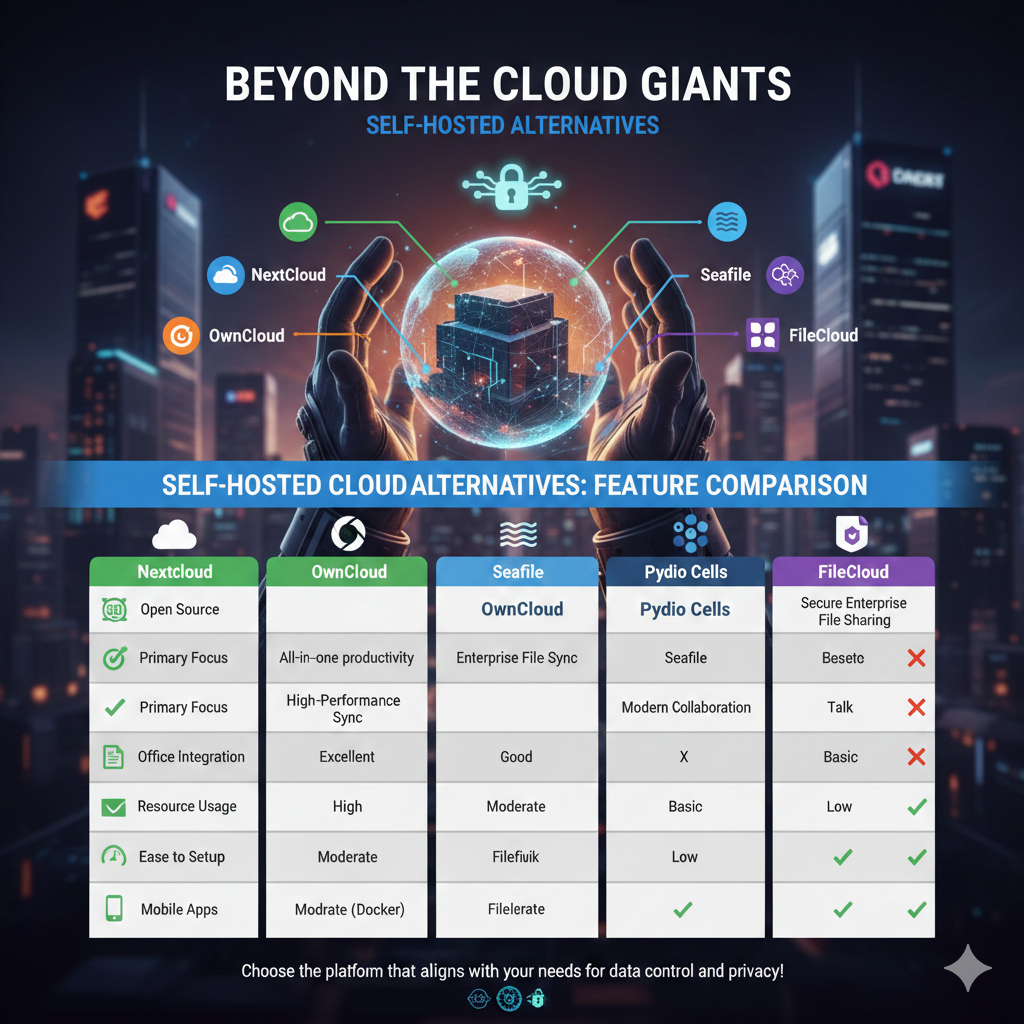
To help visualize the differences, here’s a comparative table of the discussed self-hosted cloud alternatives:
| Feature | Nextcloud | ownCloud | Seafile | Pydio Cells | FileCloud |
|---|---|---|---|---|---|
| Open Source | ✅ | ✅ (Community Edition) | ✅ (Community Edition) | ✅ (Community Edition) | ❌ |
| Primary Focus | All-in-one productivity suite | Enterprise file sync & share | High-performance file sync & share | Modern enterprise file collaboration | Secure enterprise file sharing & governance |
| Office Integration | Excellent (Collabora, ONLYOFFICE) | Good (via extensions) | Basic (viewers) | Good | Excellent |
| Video Conferencing | ✅ (Talk) | ❌ (via external tools) | ❌ | ❌ | ❌ |
| Resource Usage | Moderate to High | Moderate | Low | Moderate | Moderate |
| Ease of Setup | Moderate | Moderate | Moderate (Docker friendly) | Moderate (Docker friendly) | Moderate |
| Mobile Apps | ✅ | ✅ | ✅ | ✅ | ✅ |
“Innovation distinguishes between a leader and a follower.” – Steve Jobs
Choosing Your Self-Hosted Path: Considerations for Success 🛤️
The “best” self-hosted cloud alternative isn’t a universal answer; it depends entirely on your specific needs, technical expertise, and resources.
Here are some key considerations to guide your choice:
- Your Technical Comfort Level: Are you comfortable with command-line interfaces, server configuration, and troubleshooting? Some solutions are more beginner-friendly (especially with Docker), while others require deeper technical knowledge.
- Your Use Case: Are you an individual looking for personal file storage and sync? A family needing shared photo albums and calendars? A small business requiring robust collaboration and security? Or an enterprise with complex compliance demands?
- Resources (Hardware & Internet): Self-hosting requires a server (physical or virtual) and a stable internet connection with adequate upload speeds. Consider the storage space, RAM, and CPU you’ll need based on anticipated usage.
- Budget: While open-source solutions are often free for the software itself, you’ll incur costs for hardware, electricity, and potentially a domain name and SSL certificate. Commercial self-hosted options like FileCloud have licensing fees.
- Community vs. Professional Support: Open-source projects rely heavily on community forums and documentation. Commercial solutions typically offer dedicated professional support, which can be invaluable for businesses.
- Ecosystem & Integrations: How important are integrations with other apps and services? Nextcloud, for example, shines in its ability to become a central hub for many digital activities.
The Future is Self-Sovereign: Taking Control of Your Digital Life 🚀
The journey towards self-hosted cloud alternatives is more than just a technical decision; it’s a philosophical one.
It’s about embracing digital freedom, prioritizing privacy, and exercising control over your most valuable digital assets.
While the initial setup might seem daunting, the long-term benefits of enhanced security, complete data ownership, and unparalleled customization are profoundly rewarding.
Whether you choose the all-encompassing power of Nextcloud, the enterprise-grade reliability of ownCloud, the speed of Seafile, the modern architecture of Pydio Cells, or the robust security of FileCloud, you’re investing in a more private, secure, and personalized digital future.
The tools are readily available; the choice, and the control, are now yours. 💪
Embrace the self-hosted revolution and redefine your relationship with the cloud. ☁️➡️🏠
Here is an infographic summarizing the comparison for you!