
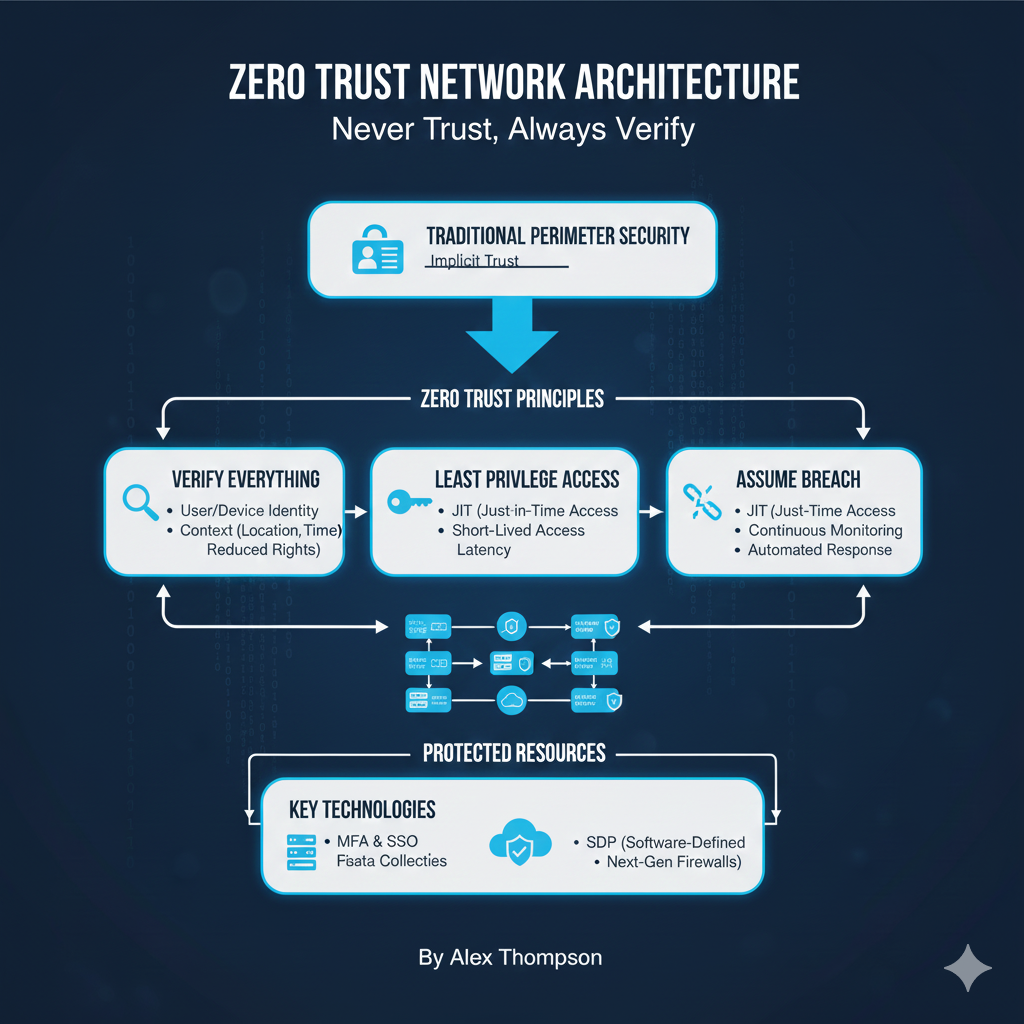
For decades, network security operated on a simple, flawed premise: trust anyone and anything inside the network perimeter.
Once a user or device was authenticated and inside the firewall, they were implicitly trusted.
The rise of cloud computing, mobile workforces, and sophisticated cyber threats has rendered this traditional “castle-and-moat” model obsolete.
The solution is the Zero Trust Network Architecture (ZTA), a strategic cybersecurity framework built on the foundational principle: “Never trust, always verify” [1].
The Core Philosophy: Eliminating Implicit Trust
Zero Trust fundamentally changes the security posture by eliminating the concept of implicit trust from the network.
Every access request, regardless of where it originates (inside or outside the network), is treated as if it comes from an untrusted source.
Key Tenets of Zero Trust
- All data sources and computing services are considered resources. The focus shifts from securing the network to securing the individual resources (applications, data, services).
- All communication is secured regardless of network location. Encryption and strong authentication are mandatory for all traffic, even within the local network segment.
- Access to individual enterprise resources is granted on a per-session basis. Access is not static; it is dynamic and continuously re-evaluated.
- Access is determined by policy, including the observable state of the client identity and the resource. The decision to grant access is based on a comprehensive set of factors, not just a username and password.
Zero Trust focuses on protecting the resources themselves, recognizing that the network location is no longer the primary factor for security [4].
https://www.youtube.com/watch?v=0h59gY0t4sI
The Five Pillars of Zero Trust (NIST Model)
The National Institute of Standards and Technology (NIST) defines a Zero Trust Architecture with five core pillars that guide implementation.
1. Identity
The user or machine identity is the most critical component of the access decision.
Strong Authentication
Multi-Factor Authentication (MFA) is mandatory for all users.
Continuous Verification
Identity is continuously monitored and re-verified throughout the session.
If a user’s behavior changes (e.g., accessing a sensitive resource from a new location), access can be revoked instantly.
2. Devices (Endpoints)
Every device accessing the network must be known, authorized, and healthy.
Device Posture Assessment
Before granting access, the system checks the device’s security posture (e.g., is the operating system patched? Is the antivirus running? Is the disk encrypted?).
Least Privilege Access
Devices are only granted the minimum access necessary to perform their function.
https://www.youtube.com/watch?v=v5g9t31343E
3. Applications and Workloads
Security policies are applied directly to the applications and services, not just the network they reside on.
Micro-segmentation
This is the practice of dividing the network into small, isolated zones, with security policies applied to each zone.
This prevents an attacker who compromises one application from moving laterally to others.
API Security
All application programming interfaces (APIs) must be secured and continuously monitored.
4. Data
Data is the most valuable asset, and security must be centered around it.
Data Classification
Data must be classified by sensitivity (e.g., public, internal, confidential).
Data-Centric Security
Policies are applied based on the data itself, including encryption at rest and in transit, and Data Loss Prevention (DLP) controls.
5. Network and Infrastructure
The network is used as an enforcement point for the policies defined in the other pillars.
Software-Defined Perimeter (SDP)
This creates a logical, secure boundary around the application, dynamically connecting the user to the resource only after verification.
Policy Enforcement Point (PEP)
This is the component (e.g., a gateway, firewall, or proxy) that grants, denies, or revokes access to a resource based on the policy decision.
The Zero Trust model shifts the security focus from the network perimeter to the user, device, and application level, making the network itself a tool for policy enforcement [5].
https://www.youtube.com/watch?v=3Qh8j0v0_t0
Zero Trust vs. Traditional Perimeter Security
The difference between ZTA and the traditional model is stark.
| Feature | Traditional Perimeter Security | Zero Trust Architecture (ZTA) |
|---|---|---|
| Core Assumption | Trust inside the perimeter, distrust outside. | Never trust, always verify. |
| Access Control | Network-based (Firewall rules, VPN access). | Identity and context-based (User, device, application, data). |
| Lateral Movement | Easy (Once inside, trust is implicit). | Prevented by micro-segmentation and per-session access. |
| Security Focus | Securing the network boundary. | Securing the individual resource (data, application). |
| Verification | One-time verification (Login). | Continuous verification and re-authentication. |
Conclusion
Zero Trust Network Architecture is not a single product but a holistic, strategic approach to modern cybersecurity.
It is a necessary evolution in a world where the traditional network perimeter has dissolved.
By implementing the principles of “Never Trust, Always Verify” across the five pillars—Identity, Devices, Applications, Data, and Network—organizations can build a resilient security posture that protects their most valuable assets from the inside out.
Adopting ZTA is the most effective way to mitigate the risk of lateral movement and ensure that every access request is rigorously validated.
https://www.youtube.com/watch?v=7hK94y1qf7I
References
[1] What is Zero Trust Architecture (ZTA)? – Palo Alto Networks
[2] The 7 Pillars for Zero Trust: An In-Depth Guide – Cybeready
[3] Zero Trust Maturity Model – CISA
[4] Zero Trust Architecture – NIST Technical Series Publications
[5] Zero Trust Policy vs. Traditional Security Models – Zscaler
YouTube Videos
https://www.youtube.com/watch?v=0h59gY0t4sI
https://www.youtube.com/watch?v=v5g9t31343E
https://www.youtube.com/watch?v=3Qh8j0v0_t0
https://www.youtube.com/watch?v=7hK94y1qf7I
https://www.youtube.com/watch?v=k9h9g-69w0k