
🤓
Wireless networking, or Wi-Fi, is the primary way most devices connect to the internet.
At the heart of Wi-Fi technology are the radio frequency bands that carry the data.
For years, the 2.4 GHz and 5 GHz bands have been the workhorses of wireless connectivity.
However, the introduction of the 6 GHz band marks a significant leap forward, promising to alleviate congestion and deliver unprecedented speeds.
Understanding the characteristics of each band—their strengths, weaknesses, and ideal use cases—is crucial for optimizing your wireless network performance [1].
The Workhorse: 2.4 GHz Band
The 2.4 GHz band is the oldest and most congested of the three.
It is used not only by Wi-Fi but also by Bluetooth devices, microwave ovens, and cordless phones, leading to significant interference.
Strengths and Weaknesses
The primary advantage of the 2.4 GHz band is its excellent range and ability to penetrate solid objects like walls and floors.
Range
Lower frequencies travel farther and are better at passing through obstacles, making 2.4 GHz ideal for covering a large area or a multi-story home.
Speed (Throughput)
The maximum theoretical speed is significantly lower than the other bands, and the actual speed is often much slower due to interference.
Congestion
With only three non-overlapping channels (1, 6, and 11), the band is highly susceptible to interference in crowded environments.
The 2.4 GHz band is best suited for devices that are far from the router or only require low bandwidth, such as smart home devices and basic web browsing.
https://www.youtube.com/watch?v=0h59gY0t4sI
The Speed Demon: 5 GHz Band
The 5 GHz band was introduced to address the congestion and speed limitations of the 2.4 GHz band.
It operates at a higher frequency, which fundamentally changes its characteristics.
Speed and Interference
The 5 GHz band offers a massive increase in speed and a much cleaner spectrum.
Speed (Throughput)
It supports much higher data rates, making it the preferred band for demanding tasks like 4K video streaming, online gaming, and large file transfers.
Interference
It has up to 25 non-overlapping channels, drastically reducing the chance of interference from neighboring networks [2].
Range
The major trade-off is range.
Higher frequencies are less effective at penetrating walls and tend to have a shorter effective range than 2.4 GHz.
Devices that are close to the router and require high bandwidth should always be connected to the 5 GHz band for optimal performance.
https://www.youtube.com/watch?v=v5g9t31343E
The New Frontier: 6 GHz Band (Wi-Fi 6E and Wi-Fi 7)
The 6 GHz band is the newest addition to the Wi-Fi spectrum, unlocked by the Wi-Fi 6E and Wi-Fi 7 standards.
It represents the most significant change to Wi-Fi in two decades.
Unprecedented Capacity
The 6 GHz band provides a vast, contiguous block of spectrum, effectively creating a “superhighway” for wireless data.
Capacity
It offers up to 1,200 MHz of new spectrum, which translates to a massive increase in capacity and a significant reduction in congestion.
Non-Overlapping Channels
It provides up to seven new 160 MHz channels, all of which are non-overlapping.
This eliminates the interference issues that plague the 2.4 GHz and 5 GHz bands.
Speed and Latency
It delivers the fastest possible speeds and ultra-low latency, making it ideal for virtual reality, augmented reality, and other next-generation applications.
The 6 GHz band shares the same range limitations as the 5 GHz band, meaning its signal does not travel as far or penetrate walls as well as 2.4 GHz.
However, for devices in the same room or close proximity, it offers the best possible performance.
https://www.youtube.com/watch?v=3Qh8j0v0_t0
Comparison of Wireless Frequency Bands
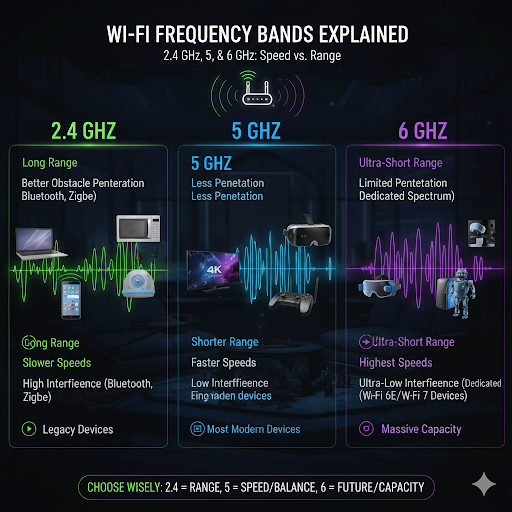
Choosing the right band for a device is a matter of balancing the need for range against the need for speed.
| Feature | 2.4 GHz | 5 GHz | 6 GHz |
|---|---|---|---|
| Range | Longest (Best for distance) | Medium (Shorter than 2.4 GHz) | Shortest (Best for close proximity) |
| Speed (Throughput) | Slowest | Fastest (Currently most common) | Fastest (Highest potential) |
| Interference | Highest (Very congested) | Low (Many non-overlapping channels) | Lowest (Brand new, clean spectrum) |
| Penetration | Best (Good through walls) | Fair | Fair |
| Ideal Use Case | Smart home devices, long-distance connections | 4K streaming, gaming, large file transfers | VR/AR, ultra-low latency, high-density environments |
Conclusion
The evolution of Wi-Fi from the congested 2.4 GHz band to the expansive 6 GHz band is a direct response to the ever-increasing demand for wireless bandwidth.
For optimal network performance, a modern router should utilize all three bands, a concept known as tri-band Wi-Fi.
By strategically connecting your devices—using 2.4 GHz for distant, low-bandwidth devices, 5 GHz for close-range, high-speed tasks, and 6 GHz for the most demanding, cutting-edge applications—you can ensure a fast, reliable, and future-proof wireless experience.
Embracing the 6 GHz band is the key to unlocking the full potential of modern Wi-Fi technology.
https://www.youtube.com/watch?v=7hK94y1qf7I
References
[1] 2.4 GHz vs. 5 GHz vs. 6 GHz: What’s the Difference? – Intel
[2] What is the difference between 2.4 GHz, 5 GHz, and 6 GHz wireless frequencies – Netgear
[3] List of WLAN channels – Wikipedia
[4] Best Wi-Fi Frequency Bands: 2.4 GHz vs. 5 GHz vs. 6 GHz – BroadbandNow
YouTube Videos
https://www.youtube.com/watch?v=0h59gY0t4sI
https://www.youtube.com/watch?v=v5g9t31343E
https://www.youtube.com/watch?v=3Qh8j0v0_t0
https://www.youtube.com/watch?v=7hK94y1qf7I
https://www.youtube.com/watch?v=k9h9g-69w0k