


If you are relying solely on Google and Facebook for blog views, you are missing a massive opportunity. 📌
Many bloggers mistakenly categorize Pinterest as just another social media platform.
In reality, Pinterest is a powerful visual discovery engine connecting millions of users with solutions to their problems. 💡
When you shift your mindset to view Pinterest through the lens of search intent, it becomes an unparalleled driver of sustainable traffic.
Unlike an Instagram post that fades away in 24 hours, a well-optimized Pin can drive traffic to your blog for months, or even years. 🚀
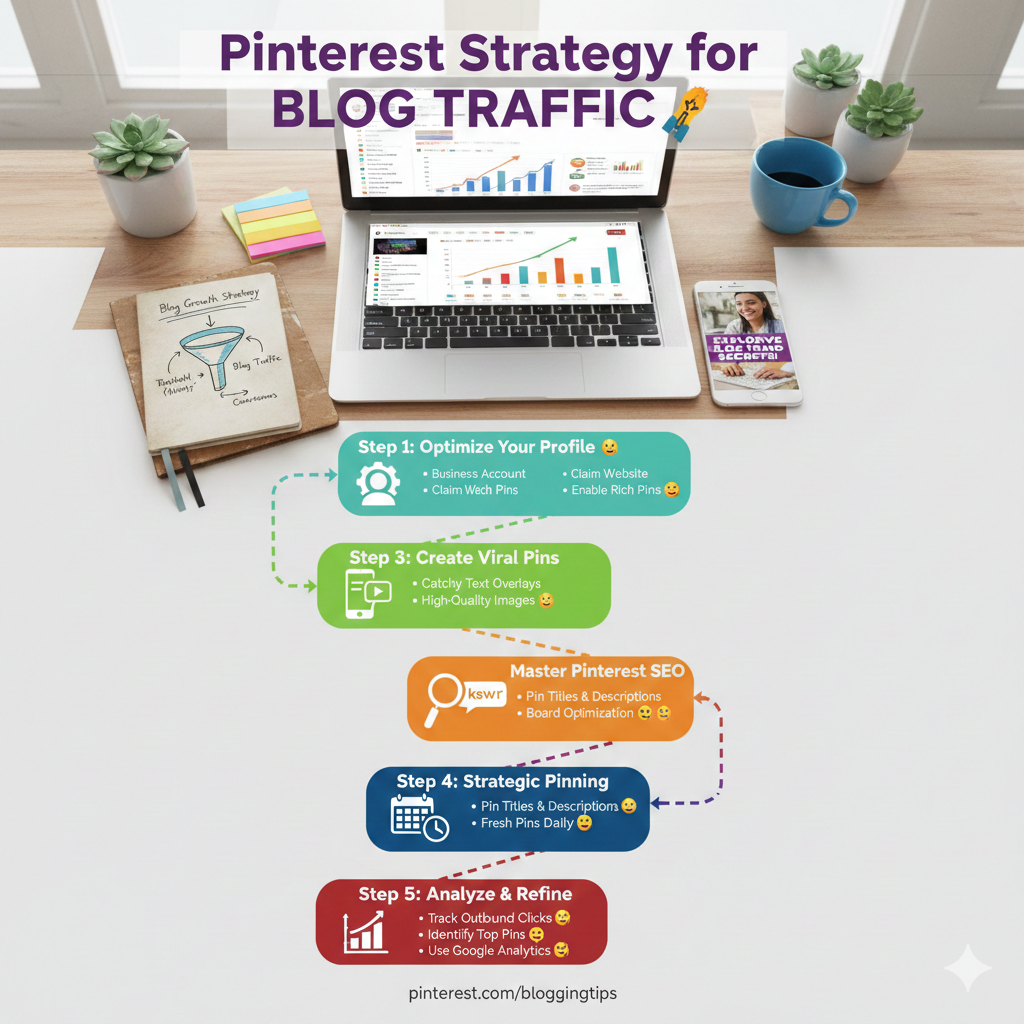
This guide will walk you through a proven Pinterest strategy for blog traffic that actually converts viewers into loyal readers.
Let’s dive into the mechanics of real blog growth strategies.
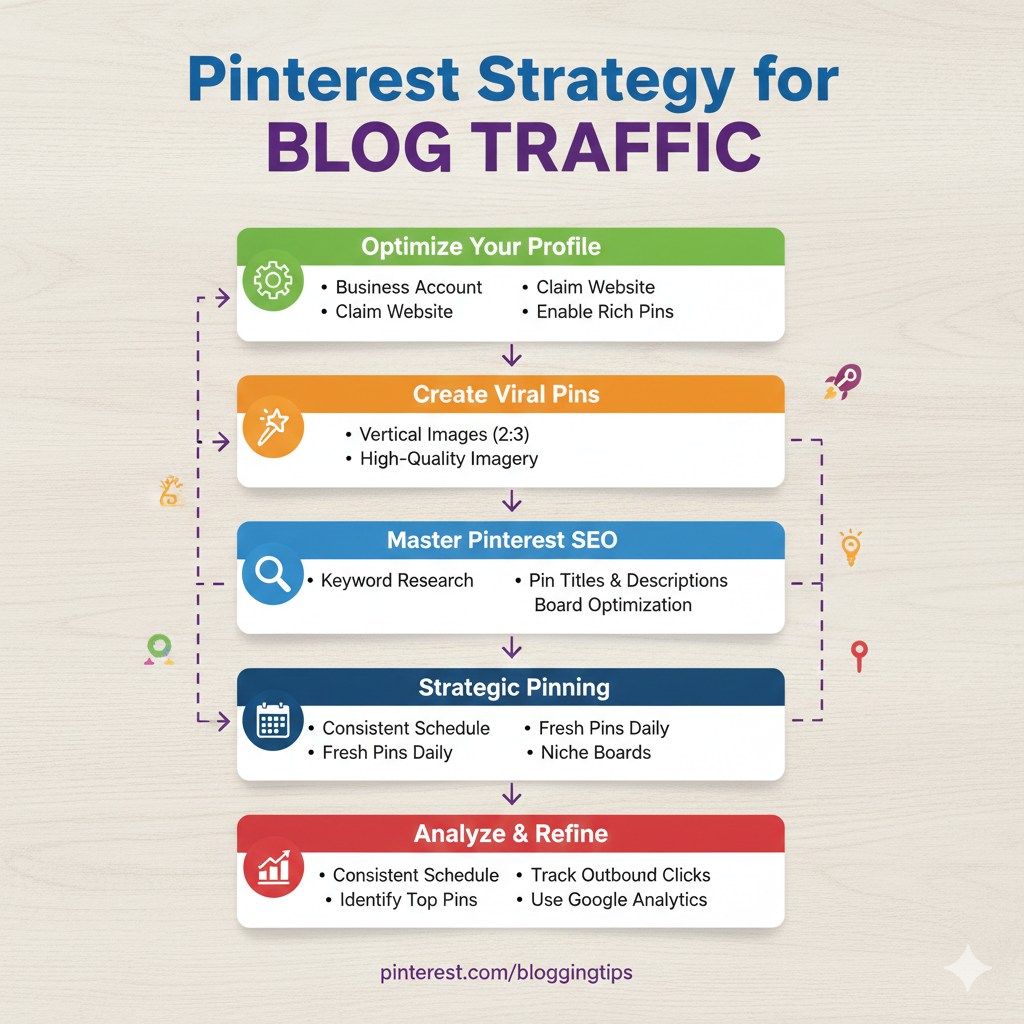
Setting the Foundation: Your Business Account
Before you start pinning randomly, you need a professional foundation. 🏗️
You must convert your personal account to a Pinterest Business account or create a new one.
A business account unlocks crucial features like Pinterest Analytics and access to ads.
Next, you must claim your website.
This tells Pinterest that you are the legitimate owner of your content and attaches your profile picture to any pin saved from your site.
Most importantly, you need to enable Rich Pins.
Rich Pins automatically pull metadata from your blog post, such as the headline and description, making your pins look more professional and authoritative. 🤓
If you are on WordPress, plugins like Yoast SEO make this process relatively simple.
You can verify if your Rich Pins are working correctly by using Pinterest’s official validator tool.
Check your Rich Pin status here with Pinterest’s Validator.
“Success depends upon previous preparation, and without such preparation there is sure to be failure.” — Confucius
Once the technical setup is complete, optimize your profile bio.
Include relevant keywords that describe exactly what your blog offers to ensure you appear in pinner searches. 🔎
The Anatomy of a High-Converting Pin
Your Pinterest strategy for blog traffic will fail if your visuals aren’t compelling.
Pinterest is a visual-first platform, so your pins need to stop the scroll. 🛑
First, ensure you are strictly using vertical images.
The ideal aspect ratio is 2:3 (e.g., 1000 x 1500 pixels).
Horizontal images get lost in the feed and perform poorly on mobile devices.
Next, you must use text overlays on your images. 🎨
Do not just slap your blog post title on an image and call it a day.
Use catchy hooks, benefit-driven headlines, or provocative questions that make clicking irresistible.
Ensure the text is large, easy to read, and contrasts well with the background image.
For design inspiration and easy-to-use templates, platforms like Canva are indispensable for bloggers.
Explore Canva’s resources for creating stunning Pinterest graphics.
Below is a quick comparison of what works versus what doesn’t in pin design.
| Effective Pin Elements ✅ | Ineffective Pin Elements ❌ |
|---|---|
| Vertical orientation (2:3 ratio) | Horizontal or square images |
| Clear, large text overlay mentioning a benefit | No text or tiny, unreadable fonts |
| High-quality, bright imagery relevant to the topic | Dark, blurry, or irrelevant stock photos |
| Subtle branding or URL at the bottom | Overwhelming logos covering the content |
Mastering Pinterest SEO: Keywords are King
Because Pinterest is a search engine, SEO is paramount to your blog growth strategies. 🔑
You need to speak the language your target audience is using when they search for ideas.
Start by conducting keyword research directly in the Pinterest search bar.
Type in your main topic and look at the suggested auto-fill options and the guided search bubbles that appear at the top. 🛁
These suggestions are gold mines because they represent exactly what people are currently searching for.
Once you have your keywords, sprinkle them strategically everywhere.
- Include your main keyword in the Pin Title.
- Write a compelling Pin Description that naturally incorporates primary and secondary keywords.
- Use relevant keywords in the titles of the Pinterest Boards you save the pin to.
Remember that Pinterest’s algorithm reads both the text on your image and the text in your description to understand what your pin is about. 🤖
Never keyword stuff; always write for humans first, but keep the algorithm in mind.
For deeper insights into search engine optimization concepts that apply here, Moz offers excellent foundational guides.
Read the Beginner’s Guide to SEO by Moz for core concepts.
The Strategic Workflow: Boards and Consistency
A winning Pinterest strategy for blog traffic requires an organized board structure and consistent activity.
Create specific, niche boards rather than broad, generic ones. 📂
Instead of a board named “Food,” create boards named “Healthy 30-Minute Dinner Recipes” or “Gluten-Free Dessert Ideas.”
These niche boards help Pinterest categorize your content more accurately and serve it to highly interested users.
Consistency is arguably more important than frequency on Pinterest today.
It is better to pin 5 high-quality pins every single day than to spam 50 pins once a week. 🗓️
To maintain consistency without losing your mind, use scheduling tools.
Tailwind is a popular partner tool that allows you to schedule pins weeks in advance at optimal times.
Learn how Tailwind can automate your Pinterest pinning schedule.
However, do not rely entirely on automation.
Spending time manually pinning inside the platform signals to Pinterest that you are an active, engaged user. 👍
“Energy and persistence conquer all things.” — Benjamin Franklin
Aim to create 3-5 fresh pin designs for every single blog post you write.
Pinterest wants “fresh pins,” which means new images they haven’t seen before, even if they link to older content.
Analyzing Data to Supercharge Growth
You cannot improve what you do not measure. 📈
Your Pinterest Analytics dashboard holds the keys to refining your strategy.
Pay close attention to “Outbound Clicks,” not just impressions or saves.
Impressions look nice, but outbound clicks are the actual traffic hitting your blog. 💻
Identify which pin designs are generating the most clicks.
Are they using a specific color scheme, a certain type of headline, or a particular photographic style?
Once you identify high-performing pins, double down on those styles.
Look at which boards are performing best and prioritize pinning to them.
It is also crucial to monitor your Google Analytics to see how Pinterest traffic behaves once it lands on your site.
Use Google Analytics to track user behavior on your blog.
If they bounce immediately, your blog post might not be delivering on the promise your pin made.
Conclusion
Implementing a robust Pinterest strategy for blog traffic is not an overnight fix.
It requires upfront effort in setting up your account, designing quality templates, and researching keywords. ⏳
However, once the flywheel starts spinning, it becomes one of the most sustainable and passive blog growth strategies available.
Start today by optimizing your profile and creating your first batch of vertical, SEO-rich pins.
Your future readers are already on Pinterest looking for answers; make sure they find your blog. 🎉