


We have all been there before.
A critical system goes down, an error message flashes on the screen that seems to be written in an alien language, and panic starts to set in.
Your immediate instinct might be to copy that error code straight into Google and frantically click the first five links.
While search engines are incredible tools, relying on them exclusively is not troubleshooting; it is merely researching.
True technical troubleshooting requires something deeper.
It requires the ability to analyze a situation logically, identify root causes, and devise effective solutions. 💡
This is where critical thinking enters the picture.
Critical thinking for technical troubleshooting is the difference between blindly trying solutions until something works and methodically diagnosing the issue to ensure it never happens again.
In this deep dive, we will explore how to move beyond “have you tried turning it off and on again” and master the art of structured problem-solving. 🚀
Defining Critical Thinking in a Technical World
Often, people assume critical thinking is just an abstract academic concept used in philosophy classes.
However, in the realm of IT and technical engineering, it is highly practical. 🛠️
It is a disciplined process of actively conceptualizing, applying, analyzing, and evaluating information gathered from observation and experience.
When applied to a server crash or a software bug, it means resisting the urge to react impulsively.
It means stepping back to look at the entire ecosystem surrounding the failure.
A critical thinker does not just see a “404 Error.”
They see a break in the chain of communication between a client and a server, and they begin to map out every possible point where that break could occur. 🗺️
They understand that the symptom is rarely the actual disease.
To get better at this, we need to understand the fundamental frameworks that guide successful troubleshooters.
You can read more about the general principles of critical thinking definitions here to understand the foundational concepts.
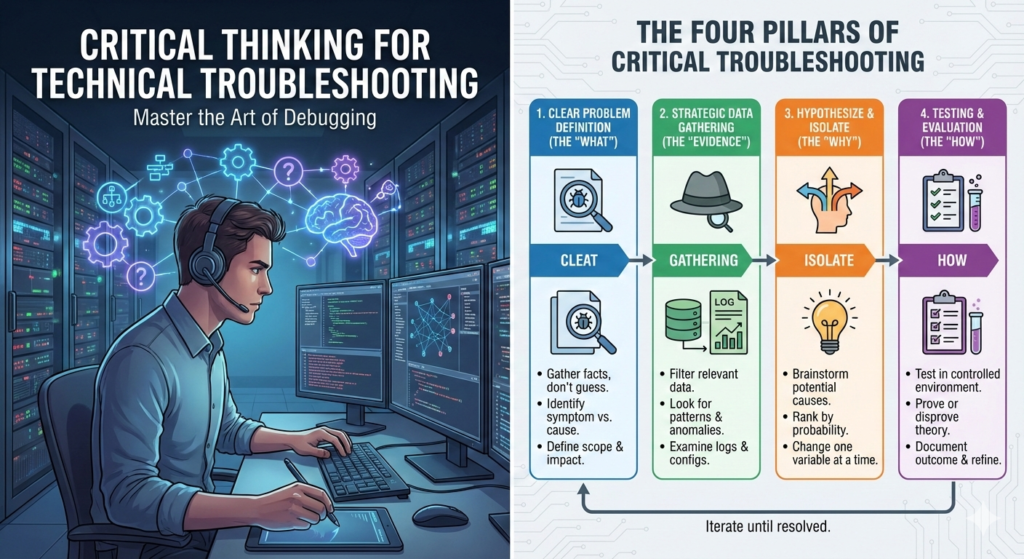
The Four Pillars of Critical Troubleshooting
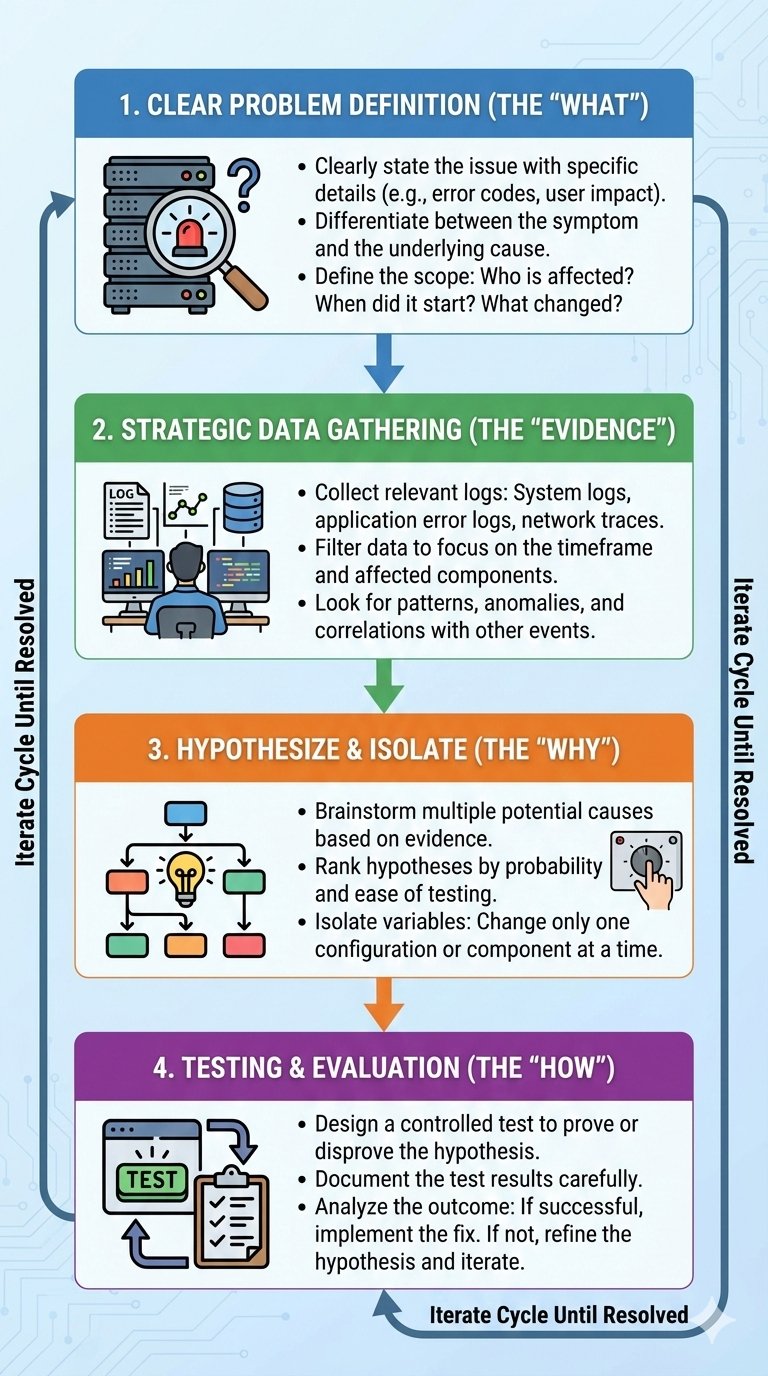
Effective troubleshooting is a cyclical process, not a straight line.
It involves loops of hypothesis and testing.
If you skip steps in this process, you will likely find yourself falling into rabbit holes that waste time and resources.
Let us break down the four essential phases of applying critical thinking to technical problems.
1. Clear Problem Definition (The “What”)
The most common mistake beginners make is trying to solve a problem they do not fully understand yet.
Albert Einstein is often credited with saying that if he had an hour to save the world, he would spend fifty-five minutes defining the problem and only five minutes finding the solution.
In tech, this means gathering the initial facts without bias. 🧐
What exactly is happening? What should be happening instead? Has anything changed recently in the environment? Who is affected, and when did it start?
Do not accept vague descriptions like “the internet is broken.”
Drill down until you have a specific, technically verifiable statement, such as “User X cannot access application Y via VPN since the 3 AM patch update.”
📌 A Relevant Insight
“A problem well stated is a problem half solved.”
— Charles Kettering
2. Strategic Data Gathering (The “Evidence”)
Once the problem is defined, you need evidence.
This is where you become a digital detective. 🕵️♀️
Critical thinking here means knowing where to look for relevant data and, crucially, knowing what data to ignore.
You must examine logs, error reports, configuration files, and network traffic.
However, avoid “log fatigue” by filtering your search based on your problem definition.
Look for patterns, anomalies, and coincidences in timing.
For instance, does the database spike in CPU usage at the exact moment the web server throws a 500 error?
Gathering accurate data is paramount to forming good hypotheses later.
For a deeper look at structured data gathering in IT, check out IBM’s documentation on troubleshooting methodology.
3. Hypothesizing and Isolating Variables (The “Why”)
This is the core of critical thinking for technical troubleshooting.
Based on the evidence you gathered, brainstorm potential causes.
Do not just settle for the first idea that pops into your head.
Generate multiple competing hypotheses and rank them based on probability and ease of testing. 📊
Once you have a hypothesis, you must isolate the variables.
If you change three configurations at once and the system starts working, you have fixed the problem, but you have learned nothing.
You do not know which change was the effective one.
A critical thinker changes one variable at a time, observes the result, and documents the outcome before moving to the next variable.
4. Testing and Evaluation (The “How”)
Now you must test your hypothesis in a controlled manner.
Ideally, this happens in a staging or test environment first, not in production! 💥
Design a test that can definitively prove or disprove your theory.
If your test confirms the hypothesis, you can move to implementing the solution permanently.
If the test fails, you must use that new information to refine your previous hypotheses. 🔄
This is not a failure; it is a successful elimination of a possibility.
The cycle continues until the root cause is identified and neutralized.
Overcoming Cognitive Biases in Tech
Even the best engineers are human and subject to mental traps.
Critical thinking requires constant vigilance against these biases that can sabotage your troubleshooting efforts.
These psychological shortcuts can lead us to incorrect conclusions very quickly. 🧠
- Confirmation Bias: This is the tendency to search for, interpret, favor, and recall information in a way that confirms your preexisting beliefs or hypotheses. If you are convinced it is a network firewall issue, you will only look at firewall logs and ignore glaring errors in the application configurations.
- Availability Heuristic: This occurs when you judge the probability of an event based on how easily an example comes to mind. If you just fixed a DNS issue yesterday, you might assume today’s totally unrelated problem is also DNS because it is fresh in your memory.
- Sunk Cost Fallacy: This is continuing down a troubleshooting path that is clearly not working simply because you have already invested hours into it. A critical thinker knows when to cut their losses, step back, and pivot to a new approach entirely.
To combat these, actively try to disprove your own theories rather than just trying to prove them.
Seek out information that contradicts your current assumption.
Learning about these biases is the first step to defeating them; resources like The Decision Lab’s list of cognitive biases are invaluable.
Tools and Models to Enhance Thinking
We cannot always rely solely on our brains under pressure.
Using established models helps structure our critical thinking and ensures we do not miss steps. 📝
One popular method is the “5 Whys” technique, originally developed by Toyota.
When a problem occurs, you ask “Why?” five times in succession to drill down past symptoms to the fundamental root cause.
Another powerful tool is simply visualization.
Drawing out network diagrams or data flow charts can help you visualize connections you might miss in text-based logs.
Below is a comparison of unstructured versus structured approaches to technical problems.
| Feature | The “Shotgun” Approach | The Critical Thinking Approach |
|---|---|---|
| Initial Reaction | Panic and immediate random guessing. | Calm observation and problem definition. |
| Data Use | Looks for data that confirms the first guess. | Gathers holistic data to form competing hypotheses. |
| Testing Method | Changes multiple settings at once hoping for a fix. | Isolates single variables and documents results accurately. |
| Outcome | Temporary fixes, high stress, recurring issues. | Root cause identified, permanent solution, learning experience. |
Conclusion: Becoming a Master Troubleshooter
Technical knowledge will get you in the door, but critical thinking will make you indispensable.
Technology changes rapidly; the specific commands you use today might be obsolete in five years.
However, the ability to dissect a problem through critical thinking for technical troubleshooting is a timeless skill that only increases in value. 💎
The next time you face a daunting system failure, resist the urge to react immediately.
Take a deep breath, define the problem, check your biases, and methodically work through the evidence.
By shifting your mindset from “fixing” to “analyzing,” you will not only solve problems faster, but you will also become a calmer, more confident technical professional.
Start practicing these steps today, and watch your troubleshooting prowess grow exponentially.
For further reading on structured IT management which includes problem management, explore frameworks like ITIL or look into site reliability engineering principles from Google’s SRE books.
📌 Final thought
“Insanity: doing the same thing over and over again and expecting different results.”
— Often attributed to Albert Einstein, but applicable to bad troubleshooting.