




![GEEKOM IT12 Business Mini PC [Low Power] with Intel Core Ultra 5 ...](https://m.media-amazon.com/images/I/41BmjlsOUTL._AC_.jpg)


When it comes to step by step tutorial setting up K3s HA cluster on Proxmox VE nodes, getting the right details matters. GEEKOM A9 Max Mini PC
GEEKOM A8 Mini PC
GEEKOM A6 Mini PC
Step-by-Step Tutorial: Setting Up a K3s HA Cluster on Proxmox VE Nodes — A Rugged-Stack Blueprint for Homelab Survival
If you have ever rebuilt a K3s cluster at 2 a.m. because the first server died and you could not promote an agent to server, this guide is for you.
The r/homelab and r/kubernetes archives are full of the same failure patterns: two control-plane nodes that kill quorum, OpenZFS ARC that swallows every spare gigabyte, a single flat VLAN that lets a runaway pod take down Proxmox, and bootstrap tokens that expire the moment you need them.
This post shows you how to build a production-like, high-availability K3s cluster on Proxmox VE using a 3-node GEEKOM A9 Max stack.
You will learn the exact hardware specs, network segmentation, VM sizing, ARC capping, K3s install commands, port rules, and storage choices that prevent the most common rebuilds.
The Technical Reality / The Failure Point
etcd Quorum Violation: Why Two Control-Plane Nodes Are Worse Than One
The quorum formula for embedded etcd is `floor(N/2) + 1`.
With N=2, the loss of one node eliminates quorum, rendering the Kubernetes API unresponsive and leaving you with all the complexity of an HA setup but none of the benefit.
A 2-node control plane is the worst possible configuration.
Run three control-plane nodes or run one, but never two.
The Single-Plane Bootstrap Trap: You Cannot Promote an Agent to Server
When you run `–cluster-init` on a single server, that node locks the cluster topology.
Adding agents does not create HA; if the first server fails before additional servers join with the initial token, the cluster state is unrecoverable.
You cannot turn a single-server K3s install into HA by adding agents later.
Plan for three servers from day one.
Proxmox Host Memory Starvation: The OpenZFS ARC Famine
OpenZFS Adaptive Replacement Cache (ARC) consumes all unallocated host RAM by default, pushing etcd fsync latency above 100 ms and triggering leader election timeouts.
Unconstrained ARC on a 64 GB node running multiple VMs exhausts memory and causes host swapping, which directly starves your control plane and forces cluster flapping.
Flat Network Blast Radius: When a Runaway Pod Takes Down Your Control Plane
Putting Proxmox management, Ceph/TrueNAS storage, Kubernetes API traffic on TCP/6443, etcd peer traffic on TCP/2379/2380, and workload traffic on one Layer-2 segment creates a single broadcast-domain failure.
A misconfigured pod can saturate the same bridge used by etcd, taking down the entire cluster.
Segment your traffic.
One bridge for management and storage, another for K3s control-plane and pod traffic.
Virtual IP Misconfiguration: The Hidden Single Point of Failure
K3s HA needs a stable endpoint: DNS round-robin, HAProxy, or a Keepalived VIP.
If the VIP is bound to a single node, or your load balancer is not itself HA, you lose the cluster endpoint during maintenance.
The VIP must float across all control-plane nodes.
A static IP on one server is not HA.
VM Overcommit Instability: OOM Kills That Corrupt etcd
Proxmox defaults allow memory overcommit.
Running three 16 GB control-plane VMs on a 32 GB host causes ballooning and OOM kills, and since etcd is especially sensitive, an OOM kill can corrupt its state.
Size physical RAM for the worst-case VM footprint, not the average.
Storage Backend Mismatch: local-path, Ceph, and Longhorn Gotchas
`local-path` creates node-local volumes that vanish when a pod is rescheduled.
Ceph/Rook on a three-node home lab adds monitor/quorum overhead that can destabilize the cluster.
Longhorn requires `open-iscsi`, `nfs-common`, `util-linux`, and `cryptsetup` on every node, and these are often omitted.
Match the storage class to the workload and install every Longhorn dependency before you deploy.
Certificate/TTL Expiry: The Bootstrap Token Time Bomb
K3s server certificates rotate automatically, but bootstrap tokens do not.
If you lose the initial join token, replacing a control-plane node requires manual certificate regeneration.
Save the token in your password manager and run `k3s certificate check` as part of your monthly maintenance.
The Core Gear Architecture
The 3-Node GEEKOM A9 Max: Flagship HA Foundation
| Component | Specification |
|---|---|
| CPU | AMD Ryzen AI 9 HX 370, 12 Cores / 24 Threads, 4 nm TSMC |
| RAM | Up to 128 GB Dual-Channel DDR5 SODIMM (Non-Soldered — Critical for Proxmox VM Allocation) |
| Network | Dual 2.5G RJ45 Ports for Control-Plane/Workload Segmentation |
| Storage | 2x M.2 PCIe Gen4 x4 NVMe Slots (Up to 8 TB Total) |
| Wireless | Wi-Fi 7 Ready |
| NPU | Up to 55 NPU TOPS (XDNA 2), Combined Up to 80 TOPS for Local LLM/AI Workloads |
This CPU gives you enough headroom to run multiple VMs per node without choking the control plane.
Non-soldered RAM lets you scale to 128 GB per node, defeating VM overcommit and leaving room for OpenZFS ARC without starvation.
Dual NICs let you isolate Proxmox management/storage on one interface and K3s cluster traffic on the other, providing the hardware fix for the flat-network blast radius.
Two Gen4 NVMe slots support thin-provisioned VM disks and dedicated passthrough for a TrueNAS/OpenZFS VM.
GEEKOM A8: The Mixed-Services Node
| Component | Specification |
|---|---|
| CPU | AMD Ryzen 9 8945HS, 8 Cores / 16 Threads, 39 NPU TOPS |
| RAM | Up to 64 GB DDR5 SODIMM |
| Network | Single 2.5G Intel LAN |
| Storage | 1x M.2 2280 NVMe PCIe Gen4x4 (Up to 4 TB) |
| Wireless | Wi-Fi 6E |
A strong mixed-services node for workers, storage gateways, or a secondary Proxmox host.
Enough for moderate VM density without overcommit.
Suits worker or storage roles where dual NICs are not required.
Fast boot and data storage for worker VMs.
GEEKOM A6: The Entry/Beginner Node
| Component | Specification |
|---|---|
| CPU | AMD Ryzen 7 6800H, 8 Cores / 16 Threads, 4.7 GHz Boost |
| RAM | Up to 64 GB DDR5 SODIMM |
| Network | Single 2.5G RJ45 LAN |
| Storage | 1x M.2 2280 PCIe Gen4x4 + 1x M.2 2242 SATA |
| Wireless | Wi-Fi 6E |
A budget-friendly entry point that still meets the baseline requirements.
Supports light control-plane or worker VM loads.
Minimum viable network for a homelab node.
Flexible storage for OS and slower bulk data.
Baseline Requirements for a K3s HA Proxmox Stack
| Requirement | Specification |
|---|---|
| Memory | DDR5 |
| Storage | NVMe Gen4 |
| Network | 2.5G Ethernet minimum |
| Architecture | Dual-NIC segmentation for control-plane isolation |
The Technical Setup Blueprint
Physical Layer & Network Segmentation
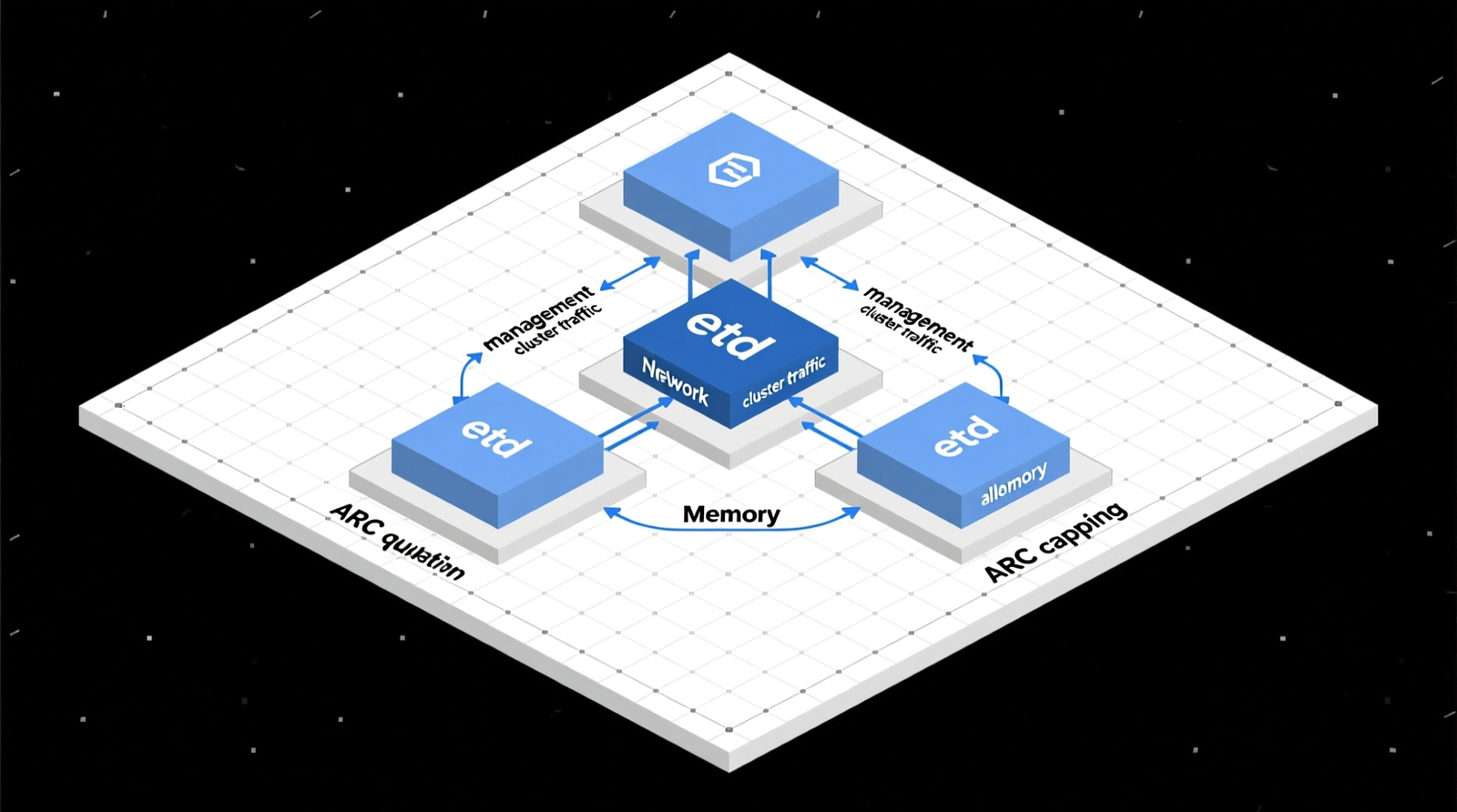
`eth0`: Proxmox Management + Ceph/TrueNAS Storage Network.
Carry Proxmox web UI, SSH, backups, and storage replication here.
`eth1`: Kubernetes Control-Plane API + Node-to-Node VXLAN/WireGuard Traffic.
Carry K3s API, etcd peer, and pod overlay traffic here.
Embedded etcd needs three control-plane nodes to tolerate one failure.
Three physical hosts also let you perform maintenance on one node without losing the cluster.
Proxmox VE Configuration for K3s VMs
Hypervisor Mode: KVM Full Virtualization + LXC Containers.
Use KVM for K3s VMs; LXC is fine for supporting services, but not for the etcd-backed control plane.
CPU Type for K3s VMs: `host` or `x86-64-v2-AES` to Expose AES-NI for etcd and WireGuard.
AES-NI accelerates etcd disk encryption and WireGuard tunneling.
SCSI Controller: VirtIO SCSI with `discard=on` for Thin-Provisioned NVMe.
Thin provisioning saves NVMe space, and `discard=on` passes TRIM through to the underlying SSD.
Network Bridges: `vmbr0` on `eth0` for Management; `vmbr1` on `eth1` for K3s Cluster Traffic.
This separation prevents a storage or workload storm from taking down the Proxmox management path.
VM Allocation Example Per GEEKOM A9 Max Node (128 GB RAM)
| VM Role | vCPU | RAM | Storage |
|---|---|---|---|
| Control-Plane | 4 | 16 GB DDR5 | 60 GB NVMe |
| Worker | 8 | 32 GB DDR5 | 200 GB NVMe |
| TrueNAS/OpenZFS (Optional) | 4 | 32 GB DDR5 | Dedicated NVMe Passthrough |
Total VM RAM per node: 48 GB.
That leaves plenty of headroom for ARC and host overhead.
OpenZFS ARC Memory Management
Default ARC Behavior: Up to 50% of Physical RAM, Expandable to Nearly All Free Memory.
Cap Formula: `zfs_arc_max = total_RAM – (VM_RAM_total + host_overhead)`.
Worked Example: 128 GB Node Hosting 48 GB of VMs → Cap ARC to ~64 GB.
Set the ARC cap in `/etc/modprobe.d/zfs.conf`:
options zfs zfs_arc_max=68719476736
Reload ZFS or reboot.
This keeps ARC from starving your VMs and prevents etcd fsync latency spikes.
K3s HA Embedded etcd Architecture
Minimum 3 Control-Plane Nodes for Quorum.
Quorum Formula Revisited: `floor(N/2) + 1`; N=3 Tolerates 1 Node Failure.
Stable Endpoint Options: HAProxy + Keepalived VIP on TCP/6443, or DNS A-Record Round-Robin Across All Control-Plane IPs.
A Keepalived VIP is the simplest homelab choice.
DNS round-robin works if your router or Pi-hole can serve multiple A records.
Required Network Ports & Firewall Rules
| Port/Protocol | Service |
|---|---|
| TCP 6443 | Kubernetes API Server |
| TCP 2379, 2380 | etcd Client and Peer Traffic |
| TCP 10250 | Kubelet API |
| TCP 10259 | kube-scheduler |
| TCP 10257 | kube-controller-manager |
| TCP 10258 | cloud-controller-manager |
| UDP 8472 | Flannel VXLAN |
| UDP 51820/51821 | Flannel WireGuard Backend |
| UDP 4789 | Cilium VXLAN |
Allow these between all K3s nodes on `vmbr1`.
Restrict TCP/6443 to your management subnet.
K3s Installation Commands
First Server:
curl -sfL https://get.k3s.io | K3S_TOKEN= sh -s - server --cluster-init --disable traefik --flannel-backend=vxlan
Additional Servers:
curl -sfL https://get.k3s.io | K3S_TOKEN= sh -s - server --server https://:6443 --disable traefik
Agents:
curl -sfL https://get.k3s.io | K3S_TOKEN= K3S_URL=https://:6443 sh -s - agent
Use the same `
Save it; the VIP is your stable endpoint.
Storage Class Selection
`local-path`: Node-Local, Non-HA, Stateless Workloads Only.
Use it for caches, logs, or anything you can recreate.
Longhorn: Requires `open-iscsi`, `nfs-common`, `util-linux`, and `cryptsetup` on Every Node.
Install dependencies first:
sudo apt update
sudo apt install -y open-iscsi nfs-common util-linux cryptsetup
Check out TECH Collection Amazon Products
SHOP THE COLLECTION
Longhorn replicates block storage across nodes and is the best HA storage choice for a three-node homelab.
Ceph/Rook: Not Recommended for Sub-4-Node Home Labs Due to Monitor/Quorum Overhead.
Ceph needs too much RAM and too many monitors for a small cluster.
Skip it unless you have at least four nodes.
Certificate & Token Lifecycle Management
Persist the Initial Cluster Token Before It Expires.
Store it in a password manager or secrets vault.
Routine: `k3s certificate check`.
Run it monthly to catch expiry issues early.
Replacement Control-Plane Node Workflow Without Manual Certificate Regeneration.
With the original token, join a replacement server using the same additional-server command.
Without it, you will be regenerating certificates manually.
Monitoring & Observability
Prometheus + Grafana on Worker Nodes.
Deploy Prometheus and Grafana as workloads on your worker VMs.
Scrape node and K3s metrics for visibility.
`kubectl top nodes` Requires metrics-server.
Install metrics-server to get CPU and memory usage from `kubectl top nodes`.
Field Verdict & Operational ROI
Total Cost of Ownership vs. Rebuilding a Broken Cluster
The classic r/homelab cycle is single-server K3s, an unrecoverable failure, and a full rebuild.
A proper 3-node HA setup with correct quorum eliminates that rebuild tax.
The hardware pays for itself the first time you avoid a weekend rebuild.
Power, Noise, and Form-Factor Gains Over Rack Servers
Three GEEKOM mini-PCs draw 35–65 W each.
An idle Dell R710 or R720 can pull more than one of those nodes by itself.
The mini-PC stack is silent, compact, and easier to keep cool.
Why This Stack Prevents the Forum-Pinned Failure Modes
No more two-node etcd traps.
No more ARC starvation on Proxmox.
No more flat-network blast radius.
No more storage-backend mismatch.
Who Should Build This Stack
DevOps engineers running self-hosted CI/CD.
Homelab operators moving from toy clusters to production-like HA.
AI/LLM experimenters leveraging the GEEKOM A9 Max NPU and 128 GB RAM ceiling.
Conclusion
A K3s HA cluster on Proxmox VE is not hard because Kubernetes is complex.
It is hard because small mistakes in quorum math, memory sizing, network segmentation, and token management compound into unrecoverable failures.
This blueprint gives you the exact hardware, VM sizing, ARC cap, network layout, ports, and commands to build a cluster that survives real-world homelab conditions.
Community Reference & Authority Resources:
Choose a 3-node GEEKOM A9 Max foundation, segment your traffic, cap ARC, use three control-plane servers from the start, and keep that bootstrap token safe.
The result is a rugged, quiet, low-power HA stack that costs less than one catastrophic rebuild and one rack server’s electricity bill.
🔍 Explore More: See all tech guides and tutorials for step by step tutorial setting up K3s HA cluster on Proxmox VE nodes.
Check out TECH Collection Amazon Products