
In the modern threat landscape, passwords alone are no longer sufficient to protect sensitive data.
Multi-Factor Authentication (MFA) is a security system that requires a user to provide two or more verification factors to gain access to a resource.
This approach dramatically reduces the risk of unauthorized access, as compromising a single factor is not enough to breach the account.
MFA is built on the principle of using factors from different categories: **Something You Know**, **Something You Have**, and **Something You Are** [1].
This comparison explores the most common types of MFA and their respective security levels.
The Three Authentication Factors
MFA requires at least two of these three distinct factors:
1. Knowledge Factor (Something You Know)
This is the most traditional factor.
It relies on information that only the user is supposed to know.
- Examples: Passwords, PINs, security questions.
- Security Level: Low. Susceptible to phishing, keylogging, and brute-force attacks.
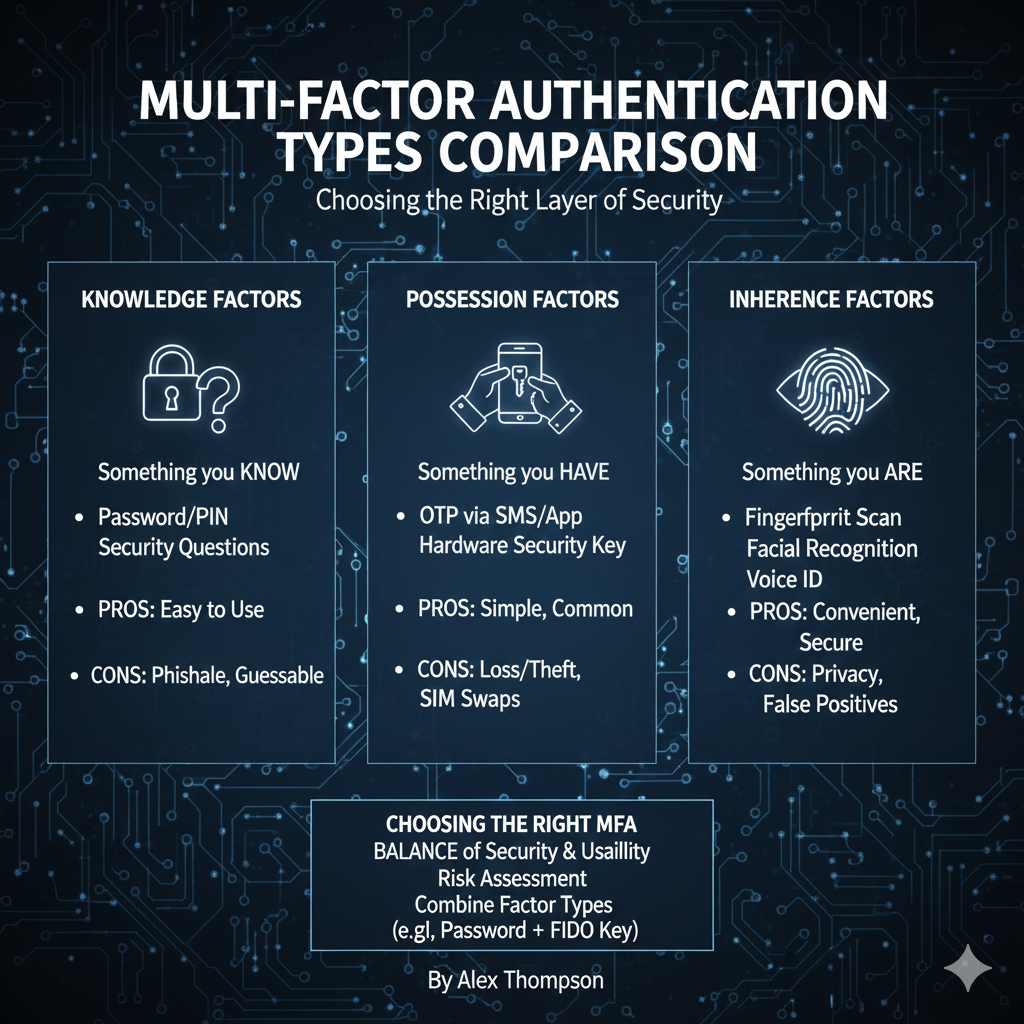
2. Possession Factor (Something You Have)
This factor relies on a physical or digital item that is in the user’s possession.
- Examples: Hardware security tokens (YubiKey), smartphone (for SMS or authenticator apps), smart cards.
- Security Level: Medium to High. More secure than knowledge factors, but susceptible to SIM-swapping (for SMS) or physical theft (for hardware tokens).
3. Inherence Factor (Something You Are)
This factor relies on a unique biological characteristic of the user.
- Examples: Fingerprint, facial recognition, iris scan, voice print.
- Security Level: High. Difficult to forge, but can be susceptible to spoofing (e.g., high-resolution photos for facial recognition).
A true MFA implementation must combine factors from at least two different categories (e.g., a password and a fingerprint), not two factors from the same category (e.g., a password and a security question).
https://www.youtube.com/watch?v=0h59gY0t4sI
Comparison of Common MFA Types
The security and usability of MFA methods vary widely.
Choosing the right combination is a balance between protection and user experience.
| MFA Type | Factor Category | Security Level | Pros | Cons |
|---|---|---|---|---|
| SMS One-Time Passcode (OTP) | Possession (Phone) | Low | Easy to implement, high user adoption. | Highly susceptible to SIM-swapping and phishing (MFA fatigue). |
| Email OTP | Possession (Email Account) | Low | Very easy to implement. | Only as secure as the email account; susceptible to man-in-the-middle attacks. |
| Software Token (Authenticator App) | Possession (Phone) | Medium | Time-based codes (TOTP) are not susceptible to SIM-swapping. | Requires a separate app; phone loss is a problem. |
| Hardware Security Key (FIDO/U2F) | Possession (Physical Key) | High | Phishing-resistant; requires physical presence. | Can be lost or stolen; higher cost; requires USB/NFC port. |
| Biometrics (Fingerprint/Face) | Inherence | High | Very fast and convenient; difficult to spoof. | Privacy concerns; requires specialized hardware. |
| Push Notification Approval | Possession (Phone) | Medium | Very convenient; high user satisfaction. | Susceptible to “MFA fatigue” attacks (repeatedly sending requests until the user approves by mistake). |
Security keys (FIDO/U2F) and biometrics are generally considered the most secure and phishing-resistant forms of MFA [2].
https://www.youtube.com/watch?v=v5g9t31343E
The Evolution of MFA: Phishing Resistance
The biggest challenge to MFA today is **phishing**.
Attackers have developed techniques to intercept or trick users into providing their second factor.
- SMS OTPs are vulnerable to SIM-swapping, where an attacker convinces a carrier to transfer the victim’s phone number to a device the attacker controls.
- Push Notifications are vulnerable to MFA fatigue, where the user is bombarded with requests until they accidentally approve one.
The industry is moving towards **phishing-resistant MFA**, primarily driven by FIDO2/WebAuthn standards, which are implemented by hardware security keys.
These methods cryptographically bind the authentication to the specific website, making it impossible for an attacker to use the code on a phishing site [3].
https://www.youtube.com/watch?v=3Qh8j0v0_t0
Conclusion
Multi-Factor Authentication is a non-negotiable security requirement for any modern organization.
While any form of MFA is better than none, the choice of factor significantly impacts the level of protection.
Organizations should prioritize moving away from easily phishable methods like SMS and email OTPs toward more robust, phishing-resistant solutions like hardware security keys and biometrics.
By implementing a layered security approach that combines different authentication factors, organizations can dramatically reduce their risk of account takeover and protect their most sensitive assets [5].
https://www.youtube.com/watch?v=7hK94y1qf7I
References
[1] 8 Multi-Factor Authentication (MFA) Types – Frontegg
[2] 5 Types of Multi-Factor Authentication (MFA) Explained – StrongDM
[3] Microsoft Entra multifactor authentication overview – Microsoft Learn
[4] Not All MFA Is Created Equal – Auth0
[5] Types of Multi Factor Authentication & How to Pick the Best – LoginRadius
YouTube Videos
https://www.youtube.com/watch?v=0h59gY0t4sI
https://www.youtube.com/watch?v=v5g9t31343E
https://www.youtube.com/watch?v=3Qh8j0v0_t0
https://www.youtube.com/watch?v=7hK94y1qf7I
https://www.youtube.com/watch?v=k9h9g-69w0k