







When it comes to step by step guide proxmox node network configuration with dual 2.5G interfaces, getting the right details matters. GEEKOM A9 Max Mini PC
FNIRSI LCR-ST1 Smart LCR Tweezers
Andonstar AD246S-M Digital Microscope
Step-by-Step Guide: Proxmox Node Network Configuration with Dual 2.5G Interfaces on the GEEKOM A9 Max
A Proxmox VE node with only one 2.5G interface creates a single contention point where corosync heartbeats, Web GUI sessions, SSH management, VM egress, storage replication, and backup streams compete for bandwidth.
This collision generates jitter, unpredictable quorum behavior, and a compromised security boundary that enterprise topology rejects.
This guide resolves these risks by implementing a production-grade Proxmox node network configuration using dual 2.5G interfaces on the GEEKOM A9 Max Mini PC.
You will learn how to zone control-plane and data-plane traffic across two native 2.5G NICs, configure Linux bridges and VLAN tagging without triggering broadcast storms, size OpenZFS ARC against VM memory, set up a reliable corosync ring, and validate that storage throughput never becomes the bottleneck.
Every command and hardware choice is anchored to a specific failure mode so you can deploy once and stop chasing intermittent cluster issues.
The Technical Reality / The Failure Point
Single-NIC Control/Data Plane Collapse: The r/homelab Warning
A single 2.5G interface forces corosync cluster heartbeat, Web GUI, SSH management, VM/LXC guest egress, storage replication, and backup streams onto one physical link.
The result is congestion, jitter, and a security-boundary collapse between Proxmox management traffic and guest workload traffic.
When a backup job saturates the link, your corosync heartbeat latency spikes.
When a guest workload floods the interface, your SSH session and Web GUI lag.
In a multi-node cluster, that instability translates directly into false-positive node isolation and split-brain risk.
Linux Bridge Misconfiguration Storms on Proxmox VE 8.x
`vmbr0` misbinding, missing VLAN tagging, or looped trunk ports trigger broadcast storms.
The consequences are ARP table corruption, intermittent VM connectivity loss, and unstable host networking.
Proxmox VE 8.x uses Debian’s Linux bridge implementation, which means a single misconfigured `bridge-ports` line or an untagged trunk leaking into the wrong bridge can propagate layer-2 loops that bring down every guest on the node.
OpenZFS ARC Memory Crunch When Soldered RAM Locks You Out
Running TrueNAS/VMs alongside ZFS-backed storage on a soldered-RAM mini PC starves the ARC.
ARC shrinkage creates host-level I/O bottlenecks that no amount of NIC bandwidth can fix.
When the Adaptive Replacement Cache cannot grow, every random read becomes a disk round-trip.
That disk latency multiplies across every VM and container on the node, even if your network is running at full 2.5G speed.
USB 2.5G Adapters: Why Forum Builds Fail Quorum
Cheap USB 2.5G Ethernet adapters collapse under sustained 2.5 Gbps load.
Reported issues include variable latency, dropped frames, MAC address persistence failures across reboots, and missing hardware offloading required by corosync.
A USB-attached second NIC is not a second NIC in the eyes of a cluster; it is a point of failure that invalidates the node for reliable cluster duty.
The Core Gear Architecture
GEEKOM A9 Max Mini PC — The Reference Node
| Specification | Details |
|---|---|
| CPU | AMD Ryzen AI 9 HX 370, 12 cores / 24 threads, 4nm TSMC |
| Memory | Up to 128 GB dual-channel DDR5 SODIMM, non-soldered, two slots |
| Networking | Dual 2.5G RJ45 LAN ports |
| Storage | 2 × M.2 PCIe Gen4 x4 NVMe SSD slots, up to 8 TB total |
| Wireless | Wi-Fi 7 ready |
| AI/NPU | AMD XDNA 2 architecture, up to 55 NPU TOPS, up to 80 TOPS combined system AI performance |
The dual native 2.5G interfaces are the headline feature for this build.
They let you bind `vmbr0` and `vmbr1` to physically separate PHYs instead of VLANs on a single port.
The 128 GB non-soldered DDR5 ceiling is equally important because it gives ZFS ARC room to breathe while still leaving headroom for VMs and containers.
GEEKOM A8 — Mid-Range Alternative
| Specification | Details |
|---|---|
| CPU | AMD Ryzen 9 8945HS, 8 cores / 16 threads, 39 NPU TOPS |
| Memory | Up to 64 GB DDR5 SODIMM |
| Networking | Single 2.5G RJ45 LAN |
| Storage | 1 × M.2 2280 NVMe PCIe Gen4 x4, up to 4 TB |
The A8 is a capable node, but the single 2.5G interface forces VLAN-based separation.
That works for light labs, yet it reintroduces the control/data plane contention this guide is designed to eliminate.
GEEKOM A6 — Entry Alternative
| Specification | Details |
|---|---|
| CPU | AMD Ryzen 7 6800H, 8 cores / 16 threads, 4.7 GHz boost |
| Memory | Up to 64 GB DDR5 SODIMM |
| Networking | Single 2.5G RJ45 LAN |
| Storage | 1 × M.2 2280 PCIe Gen4 x4 + 1 × M.2 2242 SATA |
The A6 is a budget-friendly learning platform.
It is not a candidate for a multi-node cluster that needs physical network segmentation, but it is fine for standalone Proxmox experimentation.
Why 128 GB Non-Soldered DDR5 Is Non-Negotiable for ZFS ARC
ARC consumes unused host RAM.
Budget at least 1 GB ARC per TB of usable ZFS storage.
Check out TECH Collection Amazon Products
Use `zfs_arc_max` to cap ARC and protect VM working sets.
With 128 GB physical RAM, a typical split is 64–80 GB for VM/LXC guest memory and 32–48 GB for ARC and Proxmox host overhead.
Soldered-RAM mini PCs cap that headroom at factory configuration, which means your ARC can never grow to match your storage.
The Technical Setup Blueprint
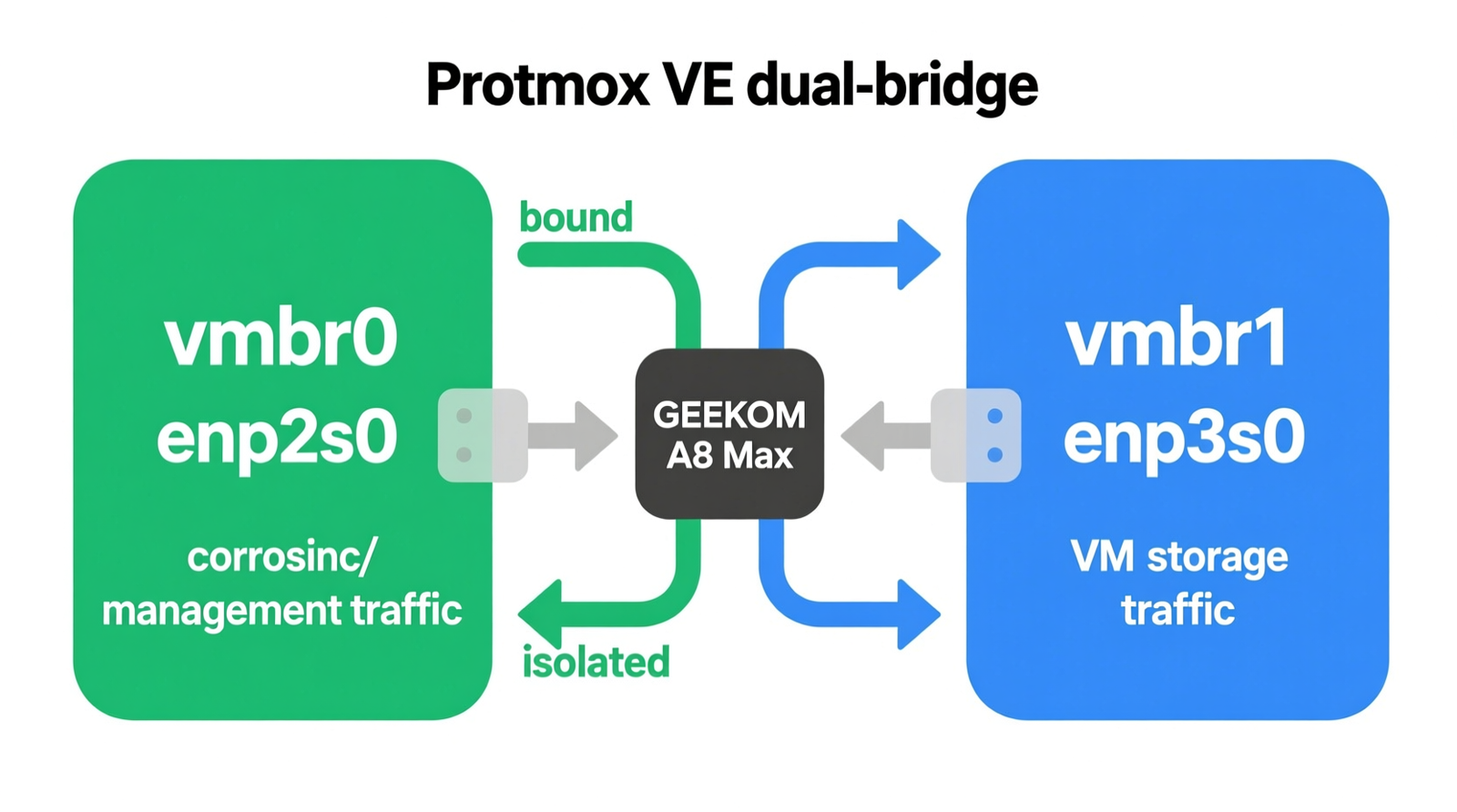
Physical Interface Zoning: `enp2s0/vmbr0` vs. `enp3s0/vmbr1`
| Zone | Interface | Traffic Type |
|---|---|---|
| Control Plane | enp2s0 → vmbr0 | Proxmox management, corosync cluster ring, SSH, Web GUI, Kubernetes control-plane API traffic |
| Data Plane | enp3s0 → vmbr1 | VM/LXC guest traffic, worker-node pod networking, storage replication, backup streams |
| Optional | VLAN Trunking on vmbr1 | Isolate guest networks and Kubernetes node subnets |
This zoning mirrors enterprise topology.
The control plane gets a dedicated, low-latency path.
The data plane carries everything else.
If a backup stream saturates `vmbr1`, your corosync ring on `vmbr0` remains unaffected.
Proxmox VE 8.x Linux Bridge Configuration
Create `vmbr0` bound to the first 2.5G interface for the control plane.
Create `vmbr1` bound to the second 2.5G interface for the data plane.
LACP/bonding is optional if a managed 2.5G switch supports link aggregation, but dual independent bridges are preferred for control/data separation in small clusters.
Bonding the two interfaces into one pipe would defeat the purpose of this build.
Edit `/etc/network/interfaces` to match your physical layout:
“`
auto lo
iface lo inet loopback
auto enp2s0
iface enp2s0 inet manual
auto enp3s0
iface enp3s0 inet manual
auto vmbr0
iface vmbr0 inet static
address 192.168.10.10/24
gateway 192.168.10.1
bridge-ports enp2s0
bridge-stp off
bridge-fd 0
auto vmbr1
iface vmbr1 inet manual
bridge-ports enp3s0
bridge-stp off
bridge-fd 0
“`
Apply the change with `ifup –all` or reboot.
Verify with `ip link show` and `brctl show` to confirm each bridge is bound to exactly one physical port.
VLAN Tagging and Kubernetes Control-Plane Isolation
Mirror enterprise topology by isolating Kubernetes API traffic from worker-node and user-facing workload traffic.
Configure allowed VLANs on trunk ports to prevent looped trunk conditions and broadcast storms.
On `vmbr1`, you can trunk multiple VLANs to a single VM or LXC by attaching a VLAN-aware bridge and assigning tags per guest:
“`
auto vmbr1.20
iface vmbr1.20 inet manual
auto vmbr1.30
iface vmbr1.30 inet manual
“`
Then assign `vmbr1.20` to your Kubernetes worker VMs and `vmbr1.30` to user-facing services.
This keeps the API server traffic on `vmbr0` while workloads live on tagged segments of `vmbr1`.
Corosync Cluster Ring and Quorum Design
Corosync requires reliable, low-latency links.
A dedicated 2.5G control-plane interface eliminates contention with replication/backup traffic.
Quorum requires at least three nodes for reliable production-like learning.
Dual interfaces improve fault isolation but do not replace quorum design.
Example `/etc/corosync/corosync.conf` ring using the control-plane subnet:
“`
totem {
version: 2
cluster_name: homelab
transport: knet
crypto_cipher: aes256
crypto_hash: sha256
interface {
ringnumber: 0
bindnetaddr: 192.168.10.10
port: 5405
}
}
nodelist {
node {
ring0_addr: 192.168.10.10
name: pve01
nodeid: 1
}
node {
ring0_addr: 192.168.10.11
name: pve02
nodeid: 2
}
node {
ring0_addr: 192.168.10.12
name: pve03
nodeid: 3
}
}
quorum {
provider: corosync_votequorum
}
“`
Run `systemctl restart corosync` and check `corosync-cfgtool -s` to confirm ring health.
OpenZFS ARC and VM Memory Budgeting
Set explicit ARC limits via `zfs_arc_max` to prevent ARC from evicting VM working sets.
Example workload allocation:
| Workload | vCPUs | Memory |
|---|---|---|
| K3s control-plane node | 4 | 16 GB DDR5 |
| Kubernetes worker node | 8 | 32 GB DDR5 |
| TrueNAS/OpenZFS VM | — | 32 GB DDR5 allocated |
Create `/etc/modprobe.d/zfs.conf` and set:
“`
options zfs zfs_arc_max=34359738368
“`
That value is 32 GB in bytes.
Rebuild initramfs with `update-initramfs -u` and reboot.
Check current ARC usage with `cat /proc/spl/kstat/zfs/arcstats | grep size`.
Storage Throughput Validation (PCIe Gen4 x4 NVMe)
Check out TECH Collection Amazon Products
M.2 PCIe Gen4 x4 NVMe SSDs deliver sequential read/write throughput well above the 2.5 Gbps network line rate.
That prevents storage from becoming the bottleneck during replication or backup.
A single Gen4 x4 drive can sustain 6,000 MB/s or more, which is roughly 20 times the 2.5 Gbps line rate.
Your network, not your disk, becomes the limiting factor, which is exactly what you want in a network-backed virtualization node.
Perimeter Hardening & Diagnostic Stack (Contextual)
| Device | Ports | Throughput | FIPS Status |
|---|---|---|---|
| Fortinet FortiGate 40F | 5 × GE RJ45 | 5 Gbps / 800 Mbps NGFW | FIPS 140-2 Level 2 |
| Fortinet FortiGate 60F | 10 × GE RJ45 | 10 Gbps / 1 Gbps NGFW | FIPS 140-2 Level 2 |
| Netgate 1100 (pfSense Plus) | 3 × 1 Gbps Switched | Dual-core ARM64 | TAA Compliant, No Active CMVP FIPS |
FIPS Transition Note: September 21, 2026 CMVP transition moves remaining active FIPS 140-2 certificates to Historical status; new procurements should target FIPS 140-3.
SIEM & Monitoring
Wazuh: Centralized log aggregation, file integrity monitoring, and audit-ready compliance reporting for continuous monitoring.
PCB Diagnostic Kit for Node Repair
| Tool | Specifications |
|---|---|
| Micro-thin copper jumper wire | 40 AWG or thinner for severed motherboard trace repair |
| FNIRSI LCR-ST1 Smart LCR Tweezers | Selectable test frequencies 100 Hz, 1 kHz, 10 kHz; dual test voltages 0.3V and 0.6V; 1.14-inch color display; 41g weight; 250mAh battery |
| Andonstar AD246S-M Digital Microscope | 7-inch LCD, three interchangeable lenses, 2160P video, dual-screen HDMI output, 30cm high bracket working clearance |
Field Verdict & Operational ROI
Failure Mode Elimination Checklist
| Feature | Benefit |
|---|---|
| Dual 2.5G interfaces | Physically separate control-plane and data-plane traffic |
| Non-soldered 128 GB DDR5 | Removes the ARC memory ceiling |
| Native dual NICs | Eliminate USB adapter instability, MAC persistence issues, and missing hardware offloading |
Total Cost of Ownership vs. Decommissioned Enterprise Rack Servers
r/homelab consensus: decommissioned rack servers are excessively loud, power-hungry, and space-inefficient compared to compact Ryzen mini PC clusters.
GEEKOM A9 Max Mini PC class nodes deliver comparable VM density at a fraction of the power, noise, and rack footprint.
You lose the enterprise BMC and redundant PSUs, but you gain a lab that fits on a shelf and sips power under load.
Why Dual 2.5G Is the 2026 Baseline
Single-interface nodes force complex VLAN workarounds that increase failure surface.
Practitioners now treat dual 2.5G interfaces as the minimum for Proxmox/Kubernetes homelabs.
The GEEKOM A9 Max Mini PC is the reference platform for a production-like learning environment that does not compromise on network segmentation, memory expandability, or storage throughput.
Conclusion
This guide showed how to build a Proxmox VE 8.x node that avoids the single-NIC trap by using two native 2.5G interfaces on the GEEKOM A9 Max Mini PC.
You now have a working control/data plane split, Linux bridge and VLAN examples, a corosync ring configuration, and an OpenZFS ARC sizing strategy that protects VM performance.
The practical benefit is a stable, scalable homelab node that behaves like enterprise infrastructure.
Corosync heartbeats stay off the data path.
Backups and replication cannot starve management traffic.
Community Reference & Authority Resources:
ZFS ARC has room to accelerate storage without evicting guest working sets.
Choose the GEEKOM A9 Max Mini PC as your reference node, apply the configuration exactly as outlined, and your cluster will stop failing for avoidable network reasons.
🔍 Explore More: See all tech guides and tutorials for step by step guide proxmox node network configuration with dual 2.5G interfaces.
Check out TECH Collection Amazon Products