

Are you grappling with the complexities of a headless CMS?
You’re not alone!
While headless content management systems offer unparalleled flexibility and power, they also introduce a unique set of challenges that can leave even seasoned developers scratching their heads.
This comprehensive guide will unpack the most common “headless CMS headaches” and provide actionable troubleshooting tips to help you navigate the decentralized world of decoupled architectures with confidence. 🤓
Let’s get started on untangling those architectural knots! 💡
Understanding the Decoupled Landscape
Before we dive into troubleshooting, it’s crucial to grasp the fundamental nature of a decoupled architecture.
Unlike traditional monolithic CMS platforms where the front-end (presentation layer) and back-end (content repository and administration) are tightly integrated, a headless CMS separates these two components entirely.
The back-end focuses solely on content creation, storage, and delivery via APIs, while the front-end can be built using any modern framework (React, Vue, Angular, etc.) that consumes this content.
This separation brings immense benefits, including enhanced flexibility, scalability, and the ability to deliver content to multiple channels simultaneously.
However, it also shifts the responsibility of integration and content presentation squarely onto the development team.
“Decoupling content from presentation empowers limitless creativity, but with great power comes great responsibility for seamless integration.”
The Feature Image: Visualizing Decoupled Architecture
To illustrate this concept, here’s a visual representation of a decoupled architecture.
It highlights the distinct layers and their interactions, helping you visualize where potential issues might arise.
Common Headless CMS Headaches and Their Cures
Let’s explore the most frequent pain points developers encounter with headless CMS and how to effectively troubleshoot them.
1. API Integration Woes 🤯
The API is the bridge between your headless CMS and your front-end.
Any issues here can bring your content delivery to a grinding halt.
Symptoms:
- Content not appearing on the front-end.
- Slow content loading times.
- Inconsistent data formatting.
- Authentication errors when accessing the API.
Troubleshooting Steps:
- Check API Endpoints: Double-check that your front-end is calling the correct API endpoints from your headless CMS. A small typo can cause big problems.
- Inspect API Keys/Tokens: Ensure your API keys or access tokens are valid and haven’t expired. Unauthorized access is a common culprit.
- Review API Documentation: Refer to your headless CMS’s API documentation meticulously. It will detail expected request formats, response structures, and any specific authentication requirements. MDN Web Docs on Web APIs can be a helpful general resource.
- Use API Testing Tools: Tools like Postman or Insomnia allow you to test API calls independently of your front-end, helping isolate issues.
- Monitor API Logs: Most headless CMS platforms offer API logs. Examine these for error messages, status codes, and request details.
2. Content Modeling Mishaps 📝
How you structure your content within the headless CMS directly impacts how easily it can be consumed by your front-end.
Poor content modeling can lead to a messy and inefficient development experience.
Symptoms:
- Difficulty mapping CMS content to front-end components.
- Excessive nested data structures.
- Content editors struggling to input data correctly.
- Inflexible content types requiring frequent reworks.
Troubleshooting Steps:
- Plan Content Types Carefully: Before building, meticulously plan your content types and fields. Consider how each piece of content will be used across different channels.
- Normalize Data: Avoid duplicating data. Use references between content types where appropriate to maintain a single source of truth.
- Collaborate with Content Editors: Involve your content team in the content modeling process. Their input is invaluable for creating user-friendly structures.
- Iterate and Refine: Content modeling is rarely perfect on the first try. Be prepared to iterate and refine your content structures as your project evolves.
3. Performance Bottlenecks 🐢
A decoupled architecture, while fast by nature, can still suffer from performance issues if not optimized correctly.
Symptoms:
- Slow page load times on the front-end.
- High API request latency.
- Excessive data being transferred.
Troubleshooting Steps:
- Implement Caching: Server-side caching (e.g., CDN, Varnish) and client-side caching (browser caching) are critical for improving performance. Learn more about CDNs from Cloudflare.
- Optimize API Queries: Fetch only the data you need. Use query parameters to filter, sort, and limit results from your API.
- Image Optimization: Ensure images delivered through your CMS are optimized for the web (compressed, correctly sized, using modern formats like WebP).
- Server-Side Rendering (SSR) or Static Site Generation (SSG): Consider SSR or SSG for faster initial page loads and improved SEO.
- Monitor Performance: Use tools like Lighthouse or WebPageTest to identify performance bottlenecks. Google’s web.dev provides great tools for measuring performance.
4. Security Vulnerabilities 🔒
With separate front-ends and back-ends, security becomes a shared responsibility.
Neglecting security in either layer can lead to serious breaches.
Symptoms:
- Unauthorized access to content.
- Data leakage.
- DDoS attacks targeting your API.
Troubleshooting Steps:
- Secure Your APIs: Implement robust authentication and authorization mechanisms (e.g., OAuth2, JWT). Use HTTPS for all API communication.
- Input Validation: Always validate user input on both the front-end and back-end to prevent injection attacks.
- Role-Based Access Control (RBAC): Ensure your headless CMS enforces granular RBAC to control who can access and modify content.
- Regular Security Audits: Periodically audit your code and infrastructure for vulnerabilities. The OWASP Top 10 provides a standard awareness document for developers and web application security.
- Keep Software Updated: Regularly update your headless CMS, front-end frameworks, and all dependencies to patch known security flaws.
5. Deployment and Workflow Complexities ⚙️
Managing separate codebases for the front-end and back-end, along with content deployment, can introduce workflow challenges.
Symptoms:
- Inconsistent deployment environments.
- Difficulty synchronizing content updates with front-end releases.
- Manual, error-prone deployment processes.
Troubleshooting Steps:
- Implement CI/CD: Continuous Integration/Continuous Deployment pipelines automate testing and deployment, reducing manual errors and improving consistency.
- Version Control for Content: While content isn’t code, consider versioning strategies within your headless CMS to track changes and roll back if necessary.
- Webhooks for Content Updates: Use webhooks from your headless CMS to trigger front-end rebuilds or cache invalidation when content changes.
- Clear Communication: Establish clear communication channels and workflows between content creators, front-end developers, and back-end teams.
| Headache | Common Symptom | Key Solution |
|---|---|---|
| API Integration Woes | Content not appearing / Slow loading | Validate endpoints, keys, and logs. |
| Content Modeling Mishaps | Difficult content mapping | Plan carefully, normalize data. |
| Performance Bottlenecks | Slow page loads | Implement caching, optimize queries. |
| Security Vulnerabilities | Unauthorized access | Secure APIs, validate input, RBAC. |
| Deployment Complexities | Inconsistent deployments | Utilize CI/CD, webhooks. |
Remember, a well-defined process and the right tools can turn complex problems into manageable tasks. 🛠️
Best Practices for Avoiding Headaches Proactively
Prevention is always better than cure.
By adopting these best practices, you can significantly reduce the likelihood of encountering common headless CMS issues.
1. Thorough Planning and Discovery 🗺️
Before writing a single line of code, invest time in understanding your project’s requirements, content needs, and target channels.
This includes detailed content modeling and API design.
2. Choose the Right Headless CMS 🛒
Not all headless CMS platforms are created equal.
Research and select a CMS that aligns with your technical stack, team’s expertise, scalability needs, and budget.
Consider features like a powerful API, user-friendly content editor, localization support, and community backing.
3. Establish Clear Development Guidelines 📏
Document API usage conventions, content modeling best practices, and front-end integration patterns.
This ensures consistency across your development team.
4. Implement Robust Testing 🧪
From unit tests for API integrations to end-to-end tests for content delivery, comprehensive testing is crucial for catching issues early.
5. Continuous Monitoring and Analytics 📈
Set up monitoring for API performance, server health, and front-end metrics.
Use analytics to understand user behavior and identify areas for improvement.
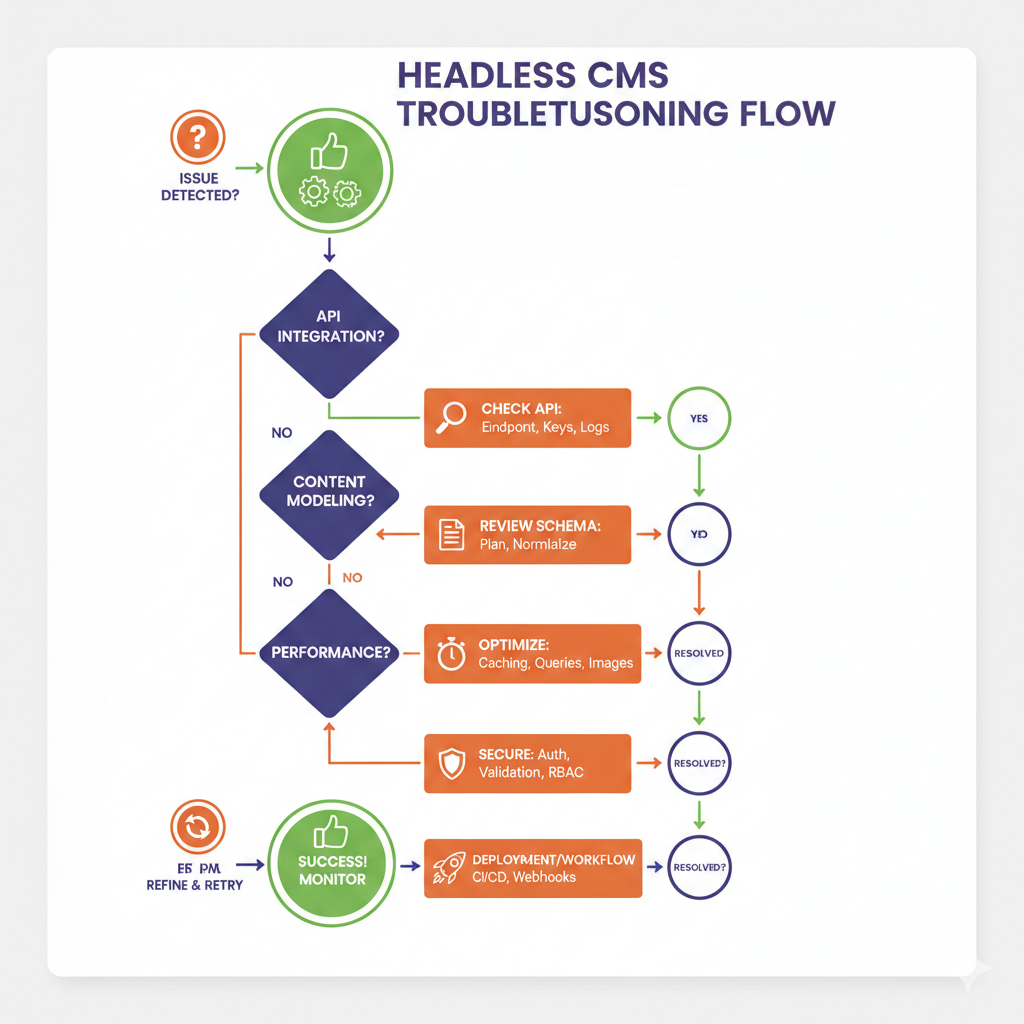
Infographic: The Decoupled Architecture Troubleshooting Flow
Here’s a helpful infographic to guide you through a typical troubleshooting flow for decoupled architectures.
It breaks down the process into logical steps.
Understanding this flow can help you systematically diagnose and resolve issues. 🎯
The Future is Decoupled, But Not Without Its Quirks
The adoption of headless CMS and decoupled architectures is steadily rising, and for good reason.
They offer unparalleled agility, future-proofing, and the ability to deliver exceptional digital experiences across diverse platforms.
However, embracing this architectural shift requires a conscious effort to understand its inherent complexities and equip your team with the right tools and knowledge to overcome them.
By proactively addressing potential headaches related to API integration, content modeling, performance, security, and deployment, you can unlock the full potential of your headless CMS.
“The journey to a truly decoupled world might have its bumps, but the destination of ultimate flexibility and scalability is well worth the effort.”
Don’t let the initial challenges deter you.
With a systematic approach to troubleshooting and a commitment to best practices, your headless CMS implementation can be a resounding success, delivering content efficiently and effectively to every corner of your digital ecosystem.
Happy debugging! 🚀