









Artificial Intelligence is no longer a futuristic concept reserved for science fiction movies.
It has firmly planted its roots in the daily routines of technologists, developers, and system administrators worldwide.
As we navigate through the current digital landscape, the integration of smart algorithms into our daily workflows is the biggest productivity multiplier we have ever seen.
The average software engineer now saves approximately 12 hours per week by offloading boilerplate code generation and documentation to intelligent language models.
Whether you are debugging a complex backend issue or simply automating your email responses, the right AI stack can transform your efficiency.
The Evolution of AI in Modern Technical Roles
In the early days of 2024, AI tools were mostly used for simple text generation.
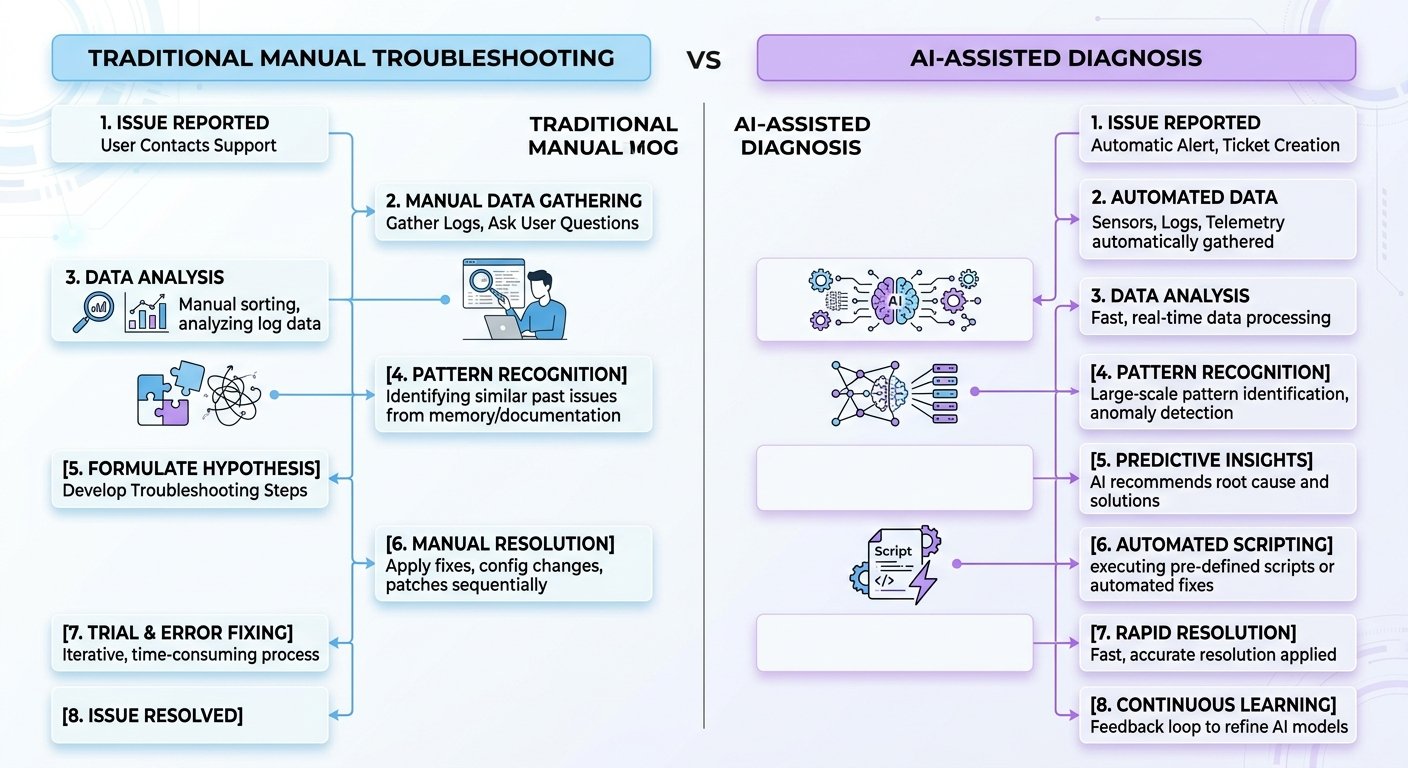
Fast forward to the latest industry standards, and we are looking at autonomous agents capable of managing server logs and executing remediation scripts in real-time.
Technologists are leveraging these advancements to transition from manual problem-solvers to system architects who oversee AI-driven infrastructures.
According to recent reports from Gartner, by the end of this period, nearly 80 percent of technical support tasks will be automated through predictive AI models.
“Intelligence is the ability to adapt to change, and AI is our greatest tool for that adaptation.”
Recent data indicates that the shift towards AI-augmented workflows has led to a 40 percent reduction in hardware failure recovery time.
This is critical for IT professionals who cannot afford downtime in mission-critical environments.
Key Benefits for the Daily Technologist
There are several distinct advantages to incorporating these smart systems into your daily toolkit.
- 💡 Pattern Recognition: AI can scan millions of lines of logs in seconds to identify anomalies that would take a human hours to find.
- 🚀 Code Completion: Modern IDE plugins suggest entire blocks of logic, significantly reducing the cognitive load of syntax memorization.
- 📌 Automated Documentation: AI tools can now interpret your code changes and automatically update your technical README files without manual input.
Maintaining focus during complex projects is easier when you have an AI companion to handle repetitive tasks and preliminary data filtering.
You can learn more about the current state of AI from TechCrunch or explore official documentation at OpenAI.
| Tool Category | Primary Function | Estimated Time Saved |
|---|---|---|
| Code Assistant | Refactoring and Bug Fixing | 30% weekly |
| Log Analyzer | Security Threat Detection | 50% daily |
| Virtual Admin | Task Scheduling | 20% weekly |
Best Practices for Implementation
Adopting new technology requires a strategic approach to ensure your security and data privacy remain intact.
Always verify the output of your AI tools, as hallucinations in generated code can lead to security vulnerabilities if deployed without testing.
Check out the latest insights on Wired regarding data safety protocols for enterprise-level AI usage.
https://www.youtube.com/watch?v=d7Jg67y1a-g
Integrate these tools slowly; start by automating your shell scripts before moving into infrastructure management.
For more deep dives into system architecture, check out Ars Technica for technical reviews.
“The secret to working with AI is treating it as an intern, not as an oracle.”
By keeping your human oversight in the loop, you maintain the quality control that is necessary for professional-grade work.
Staying updated with the latest AI trends is a requirement for any serious technologist who wants to remain competitive in the coming year.
https://www.youtube.com/watch?v=C_78zIv8D44
Keep a close eye on industry movements at The Verge to ensure you are ahead of the curve.
Your journey toward an AI-optimized life starts with a single, small automation.
Start today and watch how your daily productivity metrics climb to new heights! 🚀
🔍 Explore More: See all related guides for Ai in Technologist works for daily use on Z-A-D-A.