




![[Industrial-Grade]GEEKOM IT13 MAX Mini PC, Ultra 9 185H, 24GB RAM...](https://m.media-amazon.com/images/I/41b9KT1Oz4L._AC_.jpg)
When it comes to how to log pfSense firewall events to wazuh siem for cmmc compliance, getting the right details matters. Fortinet FortiGate 40F Next-Generation Firewall
GEEKOM A9 Max Mini PC Desktop Computer
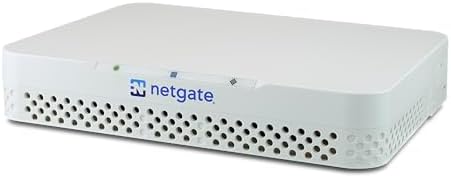
Netgate 1100 pfSense Plus Hardware Appliance
Configuring how to log pfSense firewall events to Wazuh SIEM for CMMC compliance exposes a critical infrastructure gap that defeats most small defense contractor deployments. The moment an auditor inspects your perimeter, they will identify two immediate failures: unvalidated cryptography handling Controlled Unclassified Information (CUI), and plaintext UDP syslog forwarding that violates audit-log protection controls. Logging alone does not satisfy CMMC 2.0 Level 2 requirements. This guide eliminates the configuration guesswork. You will learn exactly why default pfSense-to-Wazuh forwarding breaks compliance, how to architect a validated perimeter stack, and the precise decoder and transport configurations required to map firewall events to NIST SP 800-171 controls. We will also cover the only compliant path to retain pfSense, harden operational resilience against clock drift and packet loss, and size the compute hardware needed for high-throughput SIEM indexing.
The Technical Reality: Why pfSense + Wazuh Alone Fails CMMC
The FIPS 140-2/140-3 Validation Gap (SC.L2-3.13.11)
CMMC 2.0 Level 2 and NIST SP 800-171 Rev. 3 mandate FIPS 140-2 or FIPS 140-3 validated cryptography for any network device performing cryptographic operations on CUI. Netgate pfSense Plus hardware and the underlying software firewall do not hold an active CMVP FIPS 140-2/140-3 validation certificate.
If pfSense terminates IPsec, SSL VPN, TLS, or any other CUI-bearing cryptographic session, the entire architecture fails a CMMC audit regardless of logging configuration. You cannot patch a missing cryptographic validation with software tweaks, and auditors will immediately flag the deployment as non-compliant.
The UDP/514 Logging Integrity Failure (AU.L2-3.3.2)
Default pfSense-to-Wazuh forwarding over UDP/514 provides no encryption, no integrity protection, and no source authentication. This transmission method violates audit-log protection requirements and fails to satisfy continuous monitoring or centralized log management controls.
UDP is connectionless, meaning it silently drops events under high packet rates, creating permanent gaps in your audit trails. Auditors require tamper-evident transport to prove logs were not altered or lost during transit, and UDP fundamentally cannot deliver that proof.
The Wazuh Decoder Gap for pfSense filterlog
Wazuh does not ship with a built-in decoder for pfSense filterlog output. Without custom decoders, firewall events arrive as raw syslog strings that lack structured fields.
Raw text cannot trigger automated alerts, correlate across endpoints, or generate audit-ready reports. You must manually parse the colon-delimited filterlog format to extract rule numbers, interfaces, directions, actions, protocols, and IP/port metadata before Wazuh can utilize the data.
The Architectural Misconception: Logging ≠ Compliance
Many teams operate under the false assumption that simply forwarding pfSense logs to Wazuh achieves CMMC compliance. Logging addresses visibility, not cryptographic validation.
The only compliant way to keep pfSense in the network path is to remove it from the cryptographic scope entirely. You must encrypt CUI at the endpoint using FIPS-validated mechanisms before the traffic ever reaches the firewall, otherwise the perimeter remains a critical audit finding.
Operational Failure Modes That Break Audit Readiness
Clock drift between pfSense and Wazuh breaks event correlation if NTP is not hardened. UDP syslog drops events under high packet rates, creating gaps in audit trails. Default Wazuh log retention is insufficient for DFARS and CMMC record-keeping requirements. Running control-plane management traffic on the same segment as log-ingestion traffic increases lateral exposure.
These operational oversights compound quickly during an audit, turning a functional SIEM into a collection of disconnected, unreliable timestamps. Engineers waste weeks rebuilding log chains instead of proving continuous compliance.
The Core Gear Architecture: Validated Perimeter + SIEM Stack
| Component | Core Specifications | Compliance & Operational Role |
|---|---|---|
| Fortinet FortiGate 40F Next-Generation Firewall | 5 × GE RJ45 ports, 5 Gbps firewall throughput, 800 Mbps NGFW throughput | Active FIPS 140-2 Level 2 validation, FIPS-SEAL-RED tamper-evident kit, aligns with NIST SP 800-171 & DFARS |
| Netgate 1100 pfSense Plus Hardware Appliance | 3 × 1 Gbps switched ports, dual-core ARM64 Cortex-A53 processor, TAA/NDAA compliant | Strictly limited to routing, access control, and syslog generation outside cryptographic scope |
| GEEKOM A9 Max Mini PC Desktop Computer | AMD Ryzen AI 9 HX 370 (12C/24T), up to 128 GB DDR5, dual 2.5G RJ45, 2 × M.2 PCIe Gen4×4 NVMe | Wazuh manager/indexer host, physical network segmentation, high-throughput indexing without memory paging |
Primary Compliance-Centric Perimeter
The Fortinet FortiGate 40F Next-Generation Firewall delivers 5 × GE RJ45 ports, 5 Gbps firewall throughput, and 800 Mbps NGFW throughput while aligning with NIST SP 800-171, CMMC Level 2, and DFARS 252.204-7012. It carries an active FIPS 140-2 Level 2 validation certificate and ships with the FIPS-SEAL-RED tamper-evident kit. The Fortinet FortiGate 60F scales to 10 × GE RJ45 ports, 10 Gbps firewall throughput, and 1 Gbps NGFW throughput with identical cryptographic certification.
Both models require verification of their FIPS 140-3 recertification status due to the Sept 21, 2026 CMVP transition deadline. This hardware removes the cryptographic validation gap entirely, providing an audit-ready perimeter that handles CUI encryption without compliance friction.
Budget/Open-Source Bypass Node
The Netgate 1100 pfSense Plus Hardware Appliance runs pfSense Plus with 3 × 1 Gbps switched ports, a dual-core ARM64 Cortex-A53 processor, and TAA/NDAA compliance. Its role is strictly limited to routing, access control, and syslog generation.
Because it lacks FIPS validation, it is only acceptable in architectures where CUI is encrypted end-to-end before reaching the appliance. This node offloads basic packet filtering and log generation while staying completely outside the cryptographic scope.
Log Management / SIEM Host Hardware
The GEEKOM A9 Max Mini PC Desktop Computer serves as the Wazuh manager and indexer node. It features an AMD Ryzen AI 9 HX 370 CPU with 12 cores and 24 threads, up to 128 GB DDR5 SODIMM memory, dual 2.5G RJ45 network interfaces, and 2 × M.2 PCIe Gen4×4 NVMe slots supporting up to 8 TB total hot storage. Wi-Fi 7 support enables out-of-band management.
The 128 GB DDR5 baseline prevents memory paging during heavy indexing workloads. The dual 2.5G RJ45 ports allow physical segmentation between management APIs and log ingestion. The PCIe Gen4×4 NVMe drives sustain the random write throughput required for real-time Wazuh indexing without bottlenecking during peak traffic.
Network Segmentation & Interface Roles
You must use the GEEKOM A9 Max Mini PC Desktop Computer dual 2.5G RJ45 NICs to physically separate management and control-plane API traffic from log-ingestion traffic. Route pfSense management access and Wazuh dashboard queries through one interface. Connect the second interface exclusively to the subnet receiving forwarded syslog from pfSense and endpoint agents.
This segmentation ensures that log ingestion bursts never saturate the management bandwidth, preserving API responsiveness and preventing control-plane exposure during high-volume firewall events.
The Technical Setup Blueprint: pfSense Syslog → Wazuh with CMMC Control Mapping
pfSense Syslog Forwarding Configuration
Navigate to Status / System Logs > Settings or Services > Syslog in the pfSense web GUI. Enter the Wazuh manager IP as the remote log server. Select TCP 514 or TCP+TLS 6514 for transport. Enable the following log sources: filterlog, dhcpd, unbound, nginx, sshd, openvpn, ipsec, and system.
TLS forwarding requires a valid server certificate on the Wazuh side and the corresponding CA certificate loaded into pfSense. TCP and TCP+TLS guarantee delivery acknowledgment, prevent silent packet drops, and preserve log integrity for audit review.
Wazuh Syslog Ingestion & Custom Decoders
Configure the remote block in /var/ossec/etc/ossec.conf to listen on 514/tcp or 6514/tcp. Create a custom decoder file that parses the colon-delimited pfSense filterlog output into structured JSON fields. Map these decoded fields to custom Wazuh rules targeting CMMC-relevant events: blocked CUI-bound traffic, unauthorized VPN logins, configuration changes, failed SSH attempts, and DHCP anomalies.
This transformation converts raw firewall text into actionable telemetry that triggers automated alerts and feeds compliance dashboards. Engineers gain instant visibility into policy violations without manual log parsing.
CMMC Control Mapping
Align your firewall and SIEM configuration directly to NIST SP 800-171 controls. SC.L1-3.13.1 governs boundary protection through strict firewall rules. SC.L2-3.13.11 mandates FIPS-validated cryptography for CUI, addressed by removing pfSense from the crypto scope. AU.L1-3.3.1 requires creation and retention of audit logs, satisfied by Wazuh index lifecycle management. AU.L2-3.3.2 demands protection of audit logs from tampering, enforced via TCP+TLS transport and immutable storage. SI.L2-3.3.22 requires log analysis for indicators of compromise, enabled by your custom decoder and correlation rules.
This mapping turns routine logging into verifiable compliance evidence. Auditors can trace every firewall event directly to a specific regulatory requirement without ambiguity.
FIPS Cryptographic Bypass Path for pfSense Retention
Encrypt CUI at the endpoint using FIPS-validated TLS 1.3, application-level encryption, or a compliant Secure Web Gateway before the traffic reaches pfSense. Once encrypted, pfSense routes opaque packets and generates firewall logs without processing sensitive payloads.
This architectural shift removes pfSense from the cryptographic scope entirely. Wazuh then collects and correlates the firewall logs alongside endpoint file-integrity monitoring data, delivering a complete, audit-ready reporting chain that satisfies both visibility and cryptographic validation requirements.
Hardening Operational Resilience
Harden NTP on both pfSense and Wazuh to synchronize timestamps within milliseconds, eliminating clock drift that breaks event correlation. Replace UDP/514 with TCP/514 or TCP+TLS/6514 to enforce tamper-evident, reliable transport. Implement a hot/warm/cold index lifecycle policy with automated backup planning to meet DFARS and CMMC retention windows. Physically or logically separate control-plane management traffic from log-ingestion traffic to reduce lateral movement risk.
These steps transform a fragile logging pipeline into a resilient, audit-proof operation. Teams stop chasing missing events and start proving continuous control effectiveness.
Check out TECH Collection Amazon Products
Virtualization & Long-Term Archive Options
Deploy the Wazuh manager and Wazuh indexer as VMs or LXC containers on Proxmox VE to simplify scaling and snapshot backups. Attach long-term log archives to a TrueNAS OpenZFS pool for cold storage. Allocate sufficient DDR5 memory to the host to populate the ZFS ARC cache, which prevents I/O bottlenecks during deep historical searches across months of archived telemetry.
This virtualized tiering model keeps hot indexing fast while storing years of compliance data at minimal cost. Infrastructure teams gain enterprise-grade retention without proportional hardware spend.
Field Verdict & Operational ROI: Why the Validated Stack Pays for Itself
Audit Failure Cost vs. Validated Perimeter Investment
Small defense contractors frequently report that FortiGate FIPS bundles carry a premium upfront cost, only to discover during an actual audit that a non-FIPS pfSense deployment is a critical finding. The financial impact of remediation, delayed certification cycles, and lost government contracts consistently exceeds the initial hardware investment.
Deploying validated perimeter equipment eliminates the cryptographic gap permanently, converting a recurring audit liability into a static, passable control. Procurement teams save months of rework and protect contract revenue streams.
Real Forum Consensus: What the Community Actually Says
Engineers on r/pfsense and r/netsec consistently confirm that pfSense does not appear on the CMVP list and remains viable only when it performs zero CUI cryptography. The Wazuh Community and GitHub issue trackers repeatedly show users struggling with unparsed filterlog events, confirming that custom decoders and rulesets are mandatory. Sysadmin forums widely acknowledge that UDP/514 is convenient but fundamentally unsuitable for CMMC due to packet loss and lack of tamper evidence. The FreeBSD-based nature of pfSense makes the Wazuh agent impractical, pushing the community toward TCP or TLS syslog forwarding. Finally, time sync failures caused by NTP misconfiguration between pfSense and Wazuh routinely cause event ordering errors that auditors flag as logging integrity violations.
Community validation proves that open-source flexibility requires rigorous architectural discipline. Teams that ignore these constraints consistently fail their first compliance review.
Operational Gains of the Blueprint
This architecture delivers audit-ready log retention through hot/warm/cold lifecycle management. It enforces tamper-evident log transport via TCP+TLS. It enables actionable correlation and automated alerting for unauthorized CUI-bound activity. It establishes a clear separation of duties between network perimeter enforcement and SIEM analytics.
These operational gains transform logging from a manual compliance checkbox into a continuous, self-documenting monitoring engine. Security operations teams shift from reactive firefighting to proactive threat containment.
2026 Procurement & Validation Checklist
Verify FortiGate FIPS 140-3 recertification status before the Sept 21, 2026 CMVP transition deadline. Confirm inclusion of the FIPS-SEAL-RED tamper-evident kit with your perimeter purchase. Size the GEEKOM A9 Max Mini PC Desktop Computer with up to 128 GB DDR5 and dual 2.5G RJ45 interfaces to handle log ingestion and prevent memory bottlenecks. If retaining pfSense, document proof that CUI is encrypted end-to-end before reaching the Netgate 1100 pfSense Plus Hardware Appliance. Plan Wazuh index lifecycle policies, automated backups, and cold storage allocation before your first audit.
Following this checklist guarantees a deployment that survives regulatory scrutiny and scales with your operational workload. Procurement cycles align directly with compliance milestones.
Community Reference & Authority Resources:
Conclusion
Logging pfSense firewall events to Wazuh is straightforward in theory, but achieving CMMC 2.0 compliance requires addressing cryptographic validation, transport integrity, and structural decoding before configuring a single rule. By replacing plaintext UDP forwarding with TCP+TLS, implementing custom filterlog decoders, and aligning every event to specific NIST SP 800-171 controls, you convert raw firewall telemetry into verifiable audit evidence. Pairing a FIPS-validated perimeter like the Fortinet FortiGate 40F Next-Generation Firewall or 60F with a DDR5-powered GEEKOM A9 Max Mini PC Desktop Computer SIEM node ensures your stack withstands high-throughput indexing, maintains tamper-evident log chains, and survives the September 2026 CMVP transition. Deploy this architecture with confidence, document your cryptographic bypass path, and let your SIEM handle the correlation while your validated hardware handles the enforcement.
🔍 Explore More: See all tech guides and tutorials for how to log pfSense firewall events to wazuh siem for cmmc compliance.
Check out TECH Collection Amazon Products